
DP-100 · Question #405
Drag and Drop Question You create an Azure Machine Learning workspace and an Azure Synapse Analytics workspace with a Spark pool. The workspaces are contained within the same Azure subscription. You…
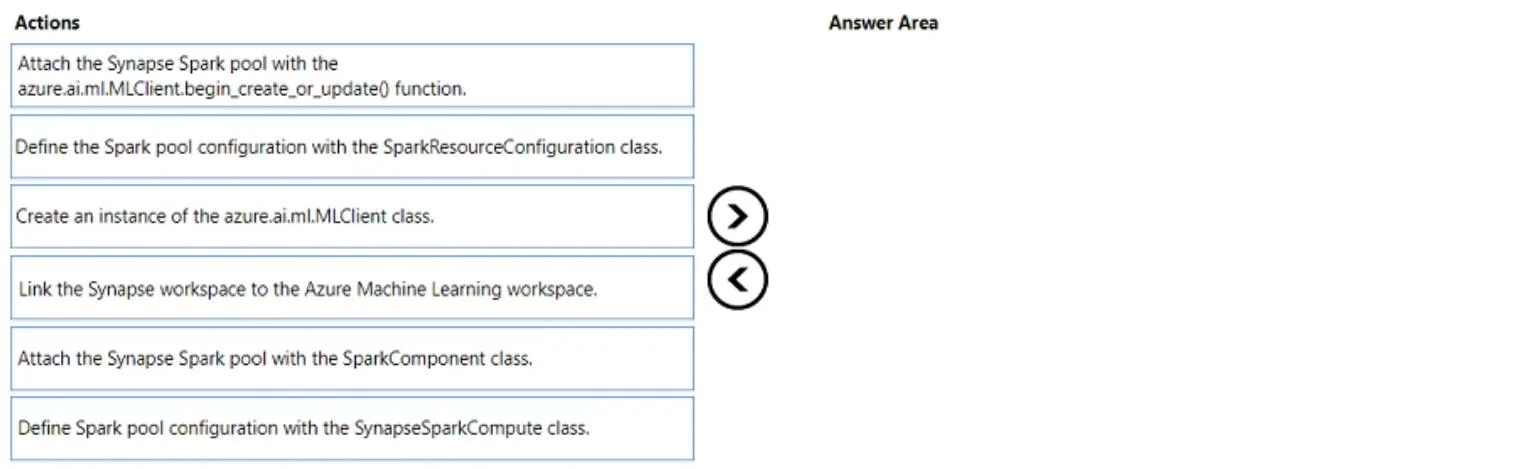
The correct answer is Create an instance of the azure.ai.MLClient class.; Define the Spark pool configuration with the SparkResourceConfiguration class.; Attach the Synapse Spark pool with the azure.ai.mlClient.begin_create_or_update() function. The correct sequence for attaching an Azure Synapse Spark pool to an Azure Machine Learning workspace using the Python SDK v2 involves initializing the MLClient, defining the Spark pool configuration, and then executing the attachment command.
Question
Exhibit
Answer Area
Drag items
Correct arrangement
- Create an instance of the azure.ai.MLClient class.
- Define the Spark pool configuration with the SparkResourceConfiguration class.
- Attach the Synapse Spark pool with the azure.ai.mlClient.begin_create_or_update() function.
Explanation
The correct sequence for attaching an Azure Synapse Spark pool to an Azure Machine Learning workspace using the Python SDK v2 involves initializing the MLClient, defining the Spark pool configuration, and then executing the attachment command.
Approach. To attach an Azure Synapse Spark pool to an Azure Machine Learning workspace using the Python SDK v2, the following three actions should be performed in sequence:
-
Create an instance of the azure.ai.ml.MLClient class.
- This is the fundamental first step for almost any interaction with the Azure Machine Learning service using the Python SDK v2. The
MLClientclass provides the interface to manage resources within your AML workspace, including compute targets. You must initialize it with your subscription, resource group, and workspace details, along with credentials.
- This is the fundamental first step for almost any interaction with the Azure Machine Learning service using the Python SDK v2. The
-
Define the Spark pool configuration with the SparkResourceConfiguration class.
- Before attaching the Synapse Spark pool, you need to define its configuration. While the
azure.ai.ml.entities.SynapseSparkComputeclass is typically used to represent the Synapse Spark compute target entity itself, the exam question's option for 'SparkResourceConfiguration' implies the step of preparing the resource-specific parameters for the compute. This configuration object will specify details like the Synapse workspace ID and the Spark pool name, which are crucial for the attachment process.
- Before attaching the Synapse Spark pool, you need to define its configuration. While the
-
Attach the Synapse Spark pool with the azure.ai.ml.MLClient.begin_create_or_update() function.
- Once the
MLClientis ready and the compute configuration object (which encapsulates the details for the Synapse Spark pool) has been defined, thebegin_create_or_update()method (specificallyml_client.compute.begin_create_or_update()) is called. This function takes the defined compute object as an argument and submits the request to Azure to either create a new compute target or update an existing one, effectively attaching the Synapse Spark pool to the Azure Machine Learning workspace.
- Once the
Common mistakes.
- common_mistake. 1. 'Link the Synapse workspace to the Azure Machine Learning workspace.' This option describes a conceptual integration or an administrative step, potentially performed via the Azure portal or Azure CLI, but it is not a direct programmatic action using the
azure.ai.mlPython SDK v2 specifically for attaching a Spark pool. The question asks for SDK v2 actions to attach the pool, not the entire workspace.
- 'Attach the Synapse Spark pool with the SparkComponent class.' The
SparkComponentclass in Azure ML SDK v2 is used to define reusable components for Spark jobs within pipelines, not for attaching external compute resources like a Synapse Spark pool itself. This would be used within a job definition, not for the compute attachment process. - 'Define Spark pool configuration with the SynapseSparkCompute class.' Although
azure.ai.ml.entities.SynapseSparkComputeis the dedicated entity class for defining a Synapse Spark compute target within AML SDK v2, the provided correct answer sequence (as shown in the second exhibit image) explicitly lists 'Define the Spark pool configuration with the SparkResourceConfiguration class.' as the second step. In the context of this specific exam question, the latter is presented as the intended configuration step, possibly implying a more abstract 'configuration' stage before instantiating the final compute object for attachment. ChoosingSynapseSparkComputewould be technically more precise for creating the compute entity, but the question's solution impliesSparkResourceConfigurationfor the 'configuration' step.
Concept tested. Azure Machine Learning SDK v2 for Python - Attaching external compute targets (specifically Azure Synapse Spark pools), client initialization, and programmatic resource configuration and management.
Topics
Community Discussion
No community discussion yet for this question.