
DP-100 · Question #314
Drag and Drop Question You train and register a model by using the Azure Machine Learning SDK on a local workstation. Python 3.6 and Visual Studio Code are installed on the workstation. When you try…
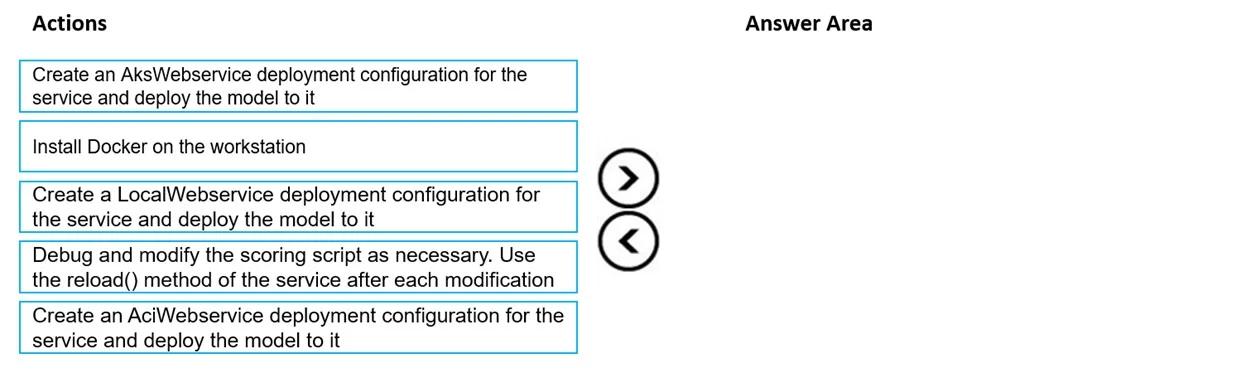
The correct answer is Install Docker on the workstation; Create a LocalWebservice deployment configuration for the service and deploy the model to it; Debug and modify the scoring script as necessary. Use the reload() method of the service after each modification; Create an AksWebservice deployment configuration for the service and deploy the model to it. To debug an Azure Machine Learning model's scoring script locally, you must first install Docker, then create and deploy a local web service, and finally debug the service using its reload method.
Question
Exhibit
Answer Area
Drag items
Correct arrangement
- Install Docker on the workstation
- Create a LocalWebservice deployment configuration for the service and deploy the model to it
- Debug and modify the scoring script as necessary. Use the reload() method of the service after each modification
- Create an AksWebservice deployment configuration for the service and deploy the model to it
Explanation
To debug an Azure Machine Learning model's scoring script locally, you must first install Docker, then create and deploy a local web service, and finally debug the service using its reload method.
Approach. The core requirement is to debug the service locally before production deployment. This means setting up a local environment that mimics the production deployment as closely as possible, without actually deploying to Azure Kubernetes Service (AKS) or Azure Container Instances (ACI).
The correct sequence of actions for local debugging is:
- Install Docker on the workstation: Azure Machine Learning local web services are containerized. Docker is a prerequisite for running these containers locally, allowing the service to simulate the cloud environment.
- Create a LocalWebservice deployment configuration for the service and deploy the model to it: This step involves defining the configuration for a local deployment (e.g., specifying a local port) and then deploying the registered model with its inference configuration (scoring script and environment) to this local web service. This makes the model callable on the local machine.
- Debug and modify the scoring script as necessary. Use the reload() method of the service after each modification: Once the local service is deployed and running, the test-taker can send requests to it, use integrated debuggers (like those in Visual Studio Code, which is mentioned as installed), and identify errors in the scoring script. The
reload()method of the local service allows for quick iteration, applying changes to the scoring script without redeploying the entire service, which is crucial for efficient debugging.
Note: The question asks for 'four actions'. However, based on the provided options and the goal of local debugging, only three actions are directly relevant and form a logical, sequential process for achieving the stated objective. If a fourth action must be selected, it indicates a potential ambiguity or flaw in the question's design, as the remaining options ('AksWebservice deployment' and 'AciWebservice deployment') are for cloud deployment, not local debugging.
Common mistakes.
- common_mistake. The common mistakes involve selecting options that are not relevant to local debugging or misordering the steps:
- 'Create an AksWebservice deployment configuration for the service and deploy the model to it': This option is incorrect because the problem explicitly states the need to debug locally before deploying to production. Deploying to AKS is a production deployment, not a local debugging step. It's the environment where the original error occurred, and the goal is to fix it before returning to production deployment.
- 'Create an AciWebservice deployment configuration for the service and deploy the model to it': Similar to AKS, ACI (Azure Container Instances) is another Azure cloud deployment target. Deploying to ACI is a production or staging deployment, not a step for debugging on the local workstation.
- Incorrect Ordering: For example, trying to debug before deploying the service locally, or deploying locally before installing Docker, would lead to errors or an inability to perform the debugging task.
Concept tested. The underlying technical concept being tested is the process of local debugging for Azure Machine Learning web services, specifically using LocalWebservice deployments to diagnose and resolve errors in a model's scoring script within a local development environment (often containerized with Docker) before deploying to production.
Topics
Community Discussion
No community discussion yet for this question.