
DP-100 · Question #315
Drag and Drop Question You create an Azure Machine Learning workspace and a new Azure DevOps organization. You register a model in the workspace and deploy the model to the target environment. All…
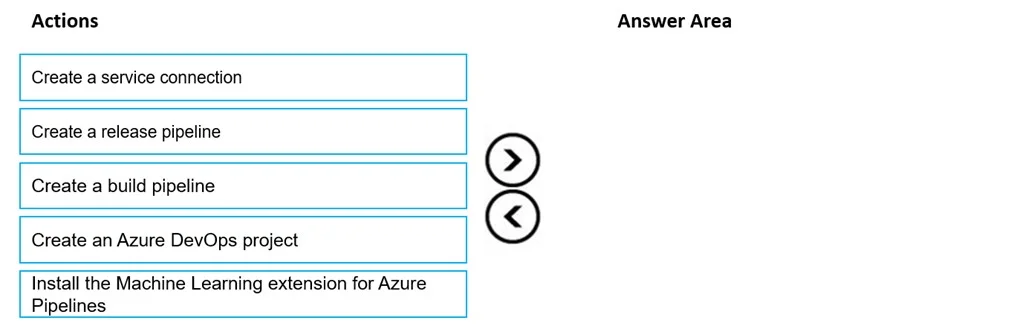
The correct answer is Create an Azure DevOps project; Create a release pipeline; Install the Machine Learning extension for Azure Pipelines; Create a service connection. To automatically deploy new Azure Machine Learning model versions, establish an Azure DevOps project, install the necessary extension, create a service connection to the Azure ML workspace, and then configure a release pipeline for deployment.
Question
Exhibit
Answer Area
Drag items
Correct arrangement
- Create an Azure DevOps project
- Create a release pipeline
- Install the Machine Learning extension for Azure Pipelines
- Create a service connection
Explanation
To automatically deploy new Azure Machine Learning model versions, establish an Azure DevOps project, install the necessary extension, create a service connection to the Azure ML workspace, and then configure a release pipeline for deployment.
Approach. The scenario requires setting up Azure Pipelines for automatic deployment of new Azure Machine Learning model versions. This involves establishing a continuous deployment (CD) pipeline. The correct sequence of four actions is:
- Create an Azure DevOps project: This is the foundational step in Azure DevOps, providing an environment to host pipelines, repositories, and other development artifacts. The question implies a new organization, so a project is needed.
- Install the Machine Learning extension for Azure Pipelines: To interact with Azure Machine Learning services from an Azure Pipeline, specialized tasks are often required. This extension provides those capabilities, such as tasks for managing models, environments, and deployments.
- Create a service connection: Azure Pipelines needs authenticated access to the Azure Machine Learning workspace to perform operations like querying for registered models or deploying new endpoints. An Azure Resource Manager service connection, configured with the 'AzureMLWorkspace' scope as shown in the exhibits, provides this secure link.
- Create a release pipeline: A release pipeline in Azure DevOps is designed for continuous deployment. It can be configured to automatically trigger upon events (such as a new model registration in Azure ML, potentially via webhooks or custom triggers) and then use the previously established service connection and ML extension tasks to deploy the model to the target environment.
This sequence ensures that the necessary infrastructure (project, extension, connection) is in place before the deployment logic (release pipeline) is defined and configured for automation.
Common mistakes.
- common_mistake. A common mistake would be to include 'Create a build pipeline' instead of 'Create a release pipeline', or to place steps out of logical order. 'Create a build pipeline' is primarily for Continuous Integration (CI) - compiling code, running tests, and producing artifacts. While some ML workflows incorporate a build pipeline (e.g., to package model dependencies or trigger training), the core requirement here is the deployment of already registered model versions. A release pipeline is explicitly designed for Continuous Deployment (CD) and is the correct choice for automatically deploying models. Placing steps like 'Create a service connection' or 'Install the Machine Learning extension' after trying to create a pipeline that uses them would also be incorrect, as these are prerequisites.
Concept tested. Continuous Integration and Continuous Deployment (CI/CD) for Machine Learning models using Azure DevOps. This includes understanding the purpose and sequence of Azure DevOps projects, extensions, service connections, and specifically the distinction between build and release pipelines for ML model deployment workflows.
Topics
Community Discussion
No community discussion yet for this question.