
DP-100 · Question #273
Drag and Drop Question You train and register a model by using the Azure Machine Learning Python SDK v2 on a local workstation. Python 3.7 and Visual Studio Code are installed on the workstation…
The correct answer is Install Docker on the workstation.; Run the begin_create_or_update method of an MLClient class instance with the local parameter set to true.; Debug and modify the scoring script as necessary. The question tests the ability to sequence actions for local debugging of an Azure Machine Learning model's scoring script using Docker and the Python SDK v2 before production deployment.
Question
Exhibit
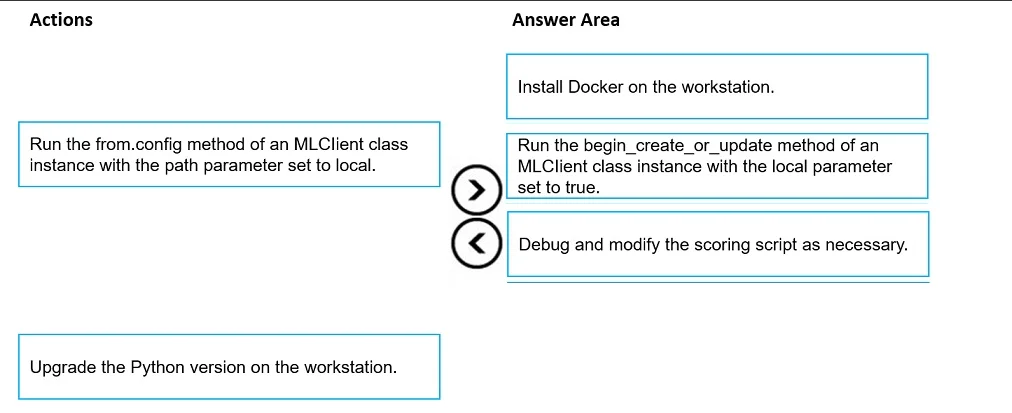
Answer Area
Drag items
Correct arrangement
- Install Docker on the workstation.
- Run the begin_create_or_update method of an MLClient class instance with the local parameter set to true.
- Debug and modify the scoring script as necessary.
Explanation
The question tests the ability to sequence actions for local debugging of an Azure Machine Learning model's scoring script using Docker and the Python SDK v2 before production deployment.
Approach. The correct approach involves understanding the steps required to debug an Azure Machine Learning online endpoint locally. The scenario indicates an error in the scoring script preventing production deployment and a need for local debugging.
- Install Docker on the workstation: Azure Machine Learning local debugging for online endpoints relies on running a local inference server within a Docker container to simulate the production environment. Therefore, Docker is a fundamental prerequisite that must be installed first.
- Run the begin_create_or_update method of an MLClient class instance with the local parameter set to true: After Docker is installed, this is the specific command in the Azure Machine Learning Python SDK v2 to deploy an online endpoint locally for debugging purposes. The
local=trueparameter is crucial as it instructs the SDK to start a local inference service in a Docker container, making the endpoint accessible for local testing and debugging. - Debug and modify the scoring script as necessary: Once the local service is running (in the Docker container, initiated by the previous step), the test-taker can attach a debugger (like the one in Visual Studio Code, as mentioned in the scenario) to this local service. This allows for stepping through the scoring script, identifying the root cause of the error, and making necessary modifications directly on the workstation before attempting production deployment again.
Common mistakes.
- common_mistake. Common mistakes include selecting actions that are not directly relevant to local debugging or are out of sequence.
- Run the from.config method of an MLClient class instance with the path parameter set to local: The
MLClient.from_config()method is used to initialize anMLClientobject, typically to connect to an Azure ML workspace by loading configuration from a file. While anMLClientinstance is needed, this specific action of settingpath=localis not the step that initiates the local deployment for debugging an online endpoint. Thelocal=trueparameter within thebegin_create_or_updatemethod is what triggers the local service. - Upgrade the Python version on the workstation: The problem states Python 3.7 is installed. While potentially an older version, the error is identified in the 'scoring script' during 'deployment', not due to a general Python environment issue on the workstation itself affecting the SDK. Local debugging through Docker isolates the environment, meaning the Python version on the workstation is less critical for the runtime environment of the scoring script within the container. Upgrading Python would not directly address a logic error in the scoring script itself and is not a prerequisite for local online endpoint debugging.
Concept tested. Local debugging of Azure Machine Learning online endpoints using the Python SDK v2, including understanding the prerequisites (Docker), the specific SDK commands (MLClient.online_endpoints.begin_create_or_update with local=true) to simulate a production environment, and the process of troubleshooting scoring scripts.
Topics
Community Discussion
No community discussion yet for this question.