
DP-100 · Question #266
Drag and Drop Question You set up a machine learning workflow as an automated process. You have an Owner role in an Azure subscription that contains the Azure Machine Learning workspace. You must…
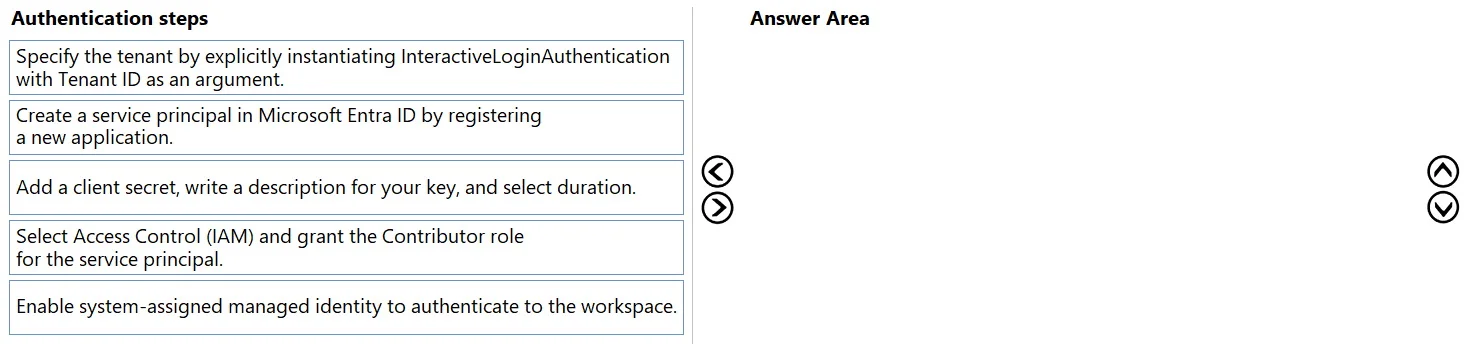
The correct answer is Create a service principal in Microsoft Entra ID by registering a new application.; Add a client secret, write a description for your key, and select duration.; Select Access Control (IAM) and grant the Contributor role for the service principal. The solution involves creating an Azure AD application registration (service principal), generating a client secret for it, and then assigning the necessary role-based access control (RBAC) permissions to the service principal on the Azure Machine Learning workspace for…
Question
Exhibit
Answer Area
Drag items
Correct arrangement
- Create a service principal in Microsoft Entra ID by registering a new application.
- Add a client secret, write a description for your key, and select duration.
- Select Access Control (IAM) and grant the Contributor role for the service principal.
Explanation
The solution involves creating an Azure AD application registration (service principal), generating a client secret for it, and then assigning the necessary role-based access control (RBAC) permissions to the service principal on the Azure Machine Learning workspace for non-interactive automated authentication.
Approach. To set up authentication for an automated process without requiring user interaction, a Service Principal is the appropriate and most common method among the given choices. The correct sequence of actions for configuring a Service Principal to access an Azure Machine Learning workspace is as follows:
- Create a service principal in Microsoft Entra ID by registering a new application. This is the foundational step to establish an identity for the automated process within Microsoft Entra ID. This registered application serves as the service principal.
- Add a client secret, write a description for your key, and select duration. Once the service principal is created, it requires a credential to authenticate. A client secret (or a certificate) provides this, enabling the automated process to prove its identity non-interactively.
- Select Access Control (IAM) and grant the Contributor role for the service principal. Finally, the service principal needs authorization to perform actions on the Azure Machine Learning workspace. This is achieved by assigning an appropriate Azure role, such as 'Contributor', to the service principal via Role-Based Access Control (RBAC) in the Access Control (IAM) blade of the workspace. This sequence ensures the creation of an identity, provision of a credential, and assignment of necessary permissions, forming a complete and secure non-interactive authentication setup.
Common mistakes.
- common_mistake. Common mistakes include selecting steps that introduce user interaction, such as 'Specify the tenant by explicitly instantiating InteractiveLoginAuthentication', which explicitly contradicts the requirement for an automated process without user interaction. Another significant mistake is attempting to mix different authentication methods. For example, the sequence shown in the second exhibit image incorrectly combines 'Enable system-assigned managed identity' (a feature for Azure-hosted resources) with 'Add a client secret' (a credential used by a service principal, not a managed identity). Managed identities rely on Azure-managed tokens and do not use client secrets. Additionally, if 'Enable system-assigned managed identity' were chosen, the subsequent step for role assignment should explicitly refer to the managed identity, not a 'service principal', as specified in one of the options. Therefore, incorrectly combining steps from distinct authentication mechanisms or choosing steps that violate the 'no user interaction' requirement are primary reasons for incorrect answers.
Concept tested. The core concept tested is understanding different Azure authentication methods for automated processes, specifically the setup of Microsoft Entra ID (formerly Azure Active Directory) Service Principals for non-interactive access to Azure resources, and the correct sequence of steps involving application registration, credential management (client secrets), and Role-Based Access Control (RBAC) via Access Control (IAM). It also implicitly tests the understanding of when to use Service Principals versus Managed Identities.
Topics
Community Discussion
No community discussion yet for this question.