
C_TB1200_10 · Question #54
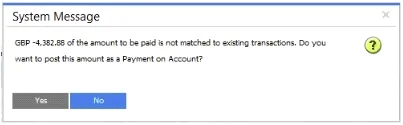
A user creates an incoming payment for a customer and selects two invoices to be paid. When the user tries to post the payment the system message that is shown in the attached screenshot appears…
The correct answer is A. The user did NOT choose a payment means B. The amount in the Payment Means window does NOT match the total amount of invoices. When posting an incoming payment in SAP Business One, the system requires two conditions to be satisfied simultaneously: a payment means must be selected (cash, check, credit card, bank transfer, etc.) and the amount entered in the Payment Means window must exactly match the…
Question
A user creates an incoming payment for a customer and selects two invoices to be paid. When the user tries to post the payment the system message that is shown in the attached screenshot appears. What are possible reasons for this system message? Note: There are 2 correct answers to this question.
Exhibit
Options
- AThe user did NOT choose a payment means
- BThe amount in the Payment Means window does NOT match the total amount of invoices
- CThe customer uses a foreign currency and the exchange rate is NOT set up
- DThe invoices ate NOT due yet
How the community answered
(22 responses)- A73% (16)
- C9% (2)
- D18% (4)
Explanation
When posting an incoming payment in SAP Business One, the system requires two conditions to be satisfied simultaneously: a payment means must be selected (cash, check, credit card, bank transfer, etc.) and the amount entered in the Payment Means window must exactly match the total of the selected invoices. If either condition is unmet, the system blocks posting and displays an error - making A and B the correct answers.
Why C is wrong: Foreign currency and exchange rate issues would trigger a different type of error (typically at the invoice or BP master data level), not a payment-posting block of this nature. Exchange rates must be set up, but their absence doesn't cause this specific message.
Why D is wrong: SAP Business One does not prevent you from paying invoices before their due date - the system allows early payment. Due date is informational; it doesn't block posting.
Memory tip: Think of the payment posting as a two-key lock - you need the method (payment means selected) and the money (amounts matching). If either key is missing, the door won't open. The error message is essentially saying: "How are they paying, and does it add up?"
Topics
Community Discussion
No community discussion yet for this question.