
AZ-900 · Question #190
Hotspot Question You need to request that Microsoft increase a subscription quota limit for your company. Which blade should you use from the Azure portal? To answer, select the appropriate blade in…
The correct answer is Which blade should you use from the Azure portal?: Help + support. To request an increase in a subscription quota limit in Azure, you must initiate a support request through the 'Help + support' blade in the Azure portal.
Question
Exhibit
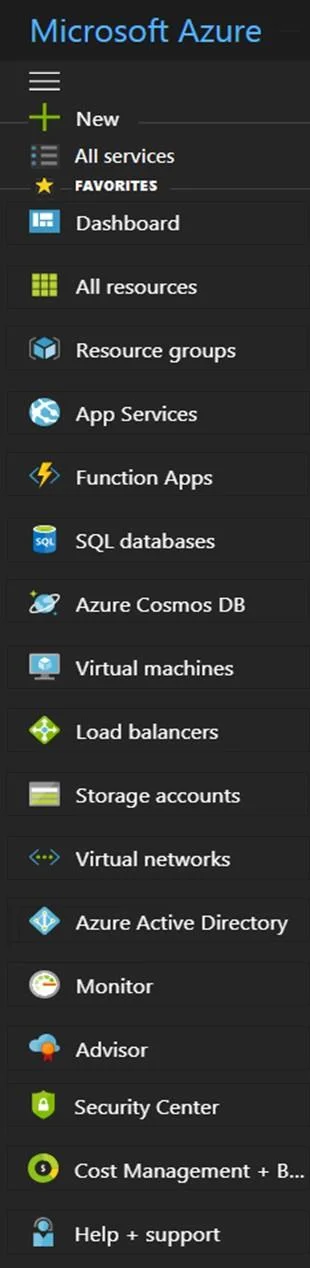
Answer Area
- Which blade should you use from the Azure portal?Help + supportNewAll servicesDashboardAll resourcesResource groupsApp ServicesFunction AppsSQL databasesAzure Cosmos DBVirtual machinesLoad balancersStorage accountsVirtual networksAzure Active DirectoryMonitorAdvisorSecurity CenterCost Management + B...Help + support
Explanation
To request an increase in a subscription quota limit in Azure, you must initiate a support request through the 'Help + support' blade in the Azure portal.
Approach. The correct interaction is to select the 'Help + support' blade. When you need to increase a subscription quota limit for resources such as virtual machine cores, public IP addresses, or storage accounts beyond the default limits, this request must be submitted to Microsoft Azure support. The 'Help + support' blade is the dedicated entry point within the Azure portal for creating new support requests, including those for service and subscription limit increases (quotas). Clicking this blade will lead you to options for creating a new support ticket where you can specify the issue type as a 'Service and subscription limits (quotas)' request.
Common mistakes.
- common_mistake. A common mistake might be to select 'Cost Management + Billing' or a specific service blade. 'Cost Management + Billing' is used for managing your billing account, subscriptions, invoices, and cost analysis, but it does not provide functionality to request quota increases. Selecting a specific service blade (e.g., 'Virtual machines' if the quota is for VM cores) would also be incorrect because quota increases are a subscription-level support issue, handled centrally, not within individual service configuration panels. 'Advisor' provides recommendations but not a mechanism for direct quota increase requests. 'All services' or 'New' are for discovering and provisioning new resources, not for managing existing subscription limits via support.
Concept tested. The core concept being tested is the knowledge of how to navigate the Azure portal to perform administrative tasks, specifically how to initiate a support request for increasing subscription quota limits. This demonstrates understanding of Azure's operational procedures and support model.
Reference. https://learn.microsoft.com/en-us/azure/azure-portal/supportability/create-azure-support-request
Topics
Community Discussion
No community discussion yet for this question.