
AZ-900 · Question #183
Hotspot Question How should you calculate the monthly uptime percentage? To answer, select the appropriate options in the answer area. NOTE: Each correct selection is worth one point. Answer:
The correct answer is First dropdown selection: (Maximum Available Minutes - Downtime in Minutes); Second dropdown selection: Maximum Available Minutes; Third dropdown selection: 100. The question requires selecting the correct mathematical components to calculate monthly uptime percentage, which is derived from subtracting downtime from total available time, dividing by total available time, and multiplying by 100.
Question
Exhibit
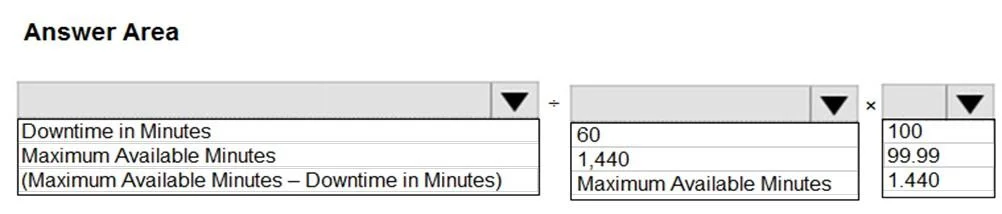
Answer Area
- First dropdown selection(Maximum Available Minutes - Downtime in Minutes)Downtime in MinutesMaximum Available Minutes(Maximum Available Minutes - Downtime in Minutes)
- Second dropdown selectionMaximum Available Minutes601,440Maximum Available Minutes
- Third dropdown selection10010099.991,440
Explanation
The question requires selecting the correct mathematical components to calculate monthly uptime percentage, which is derived from subtracting downtime from total available time, dividing by total available time, and multiplying by 100.
Approach. To calculate the monthly uptime percentage, the standard formula is (Total Available Time - Downtime) / Total Available Time * 100. Applying this to the provided options:
- For the first dropdown (Numerator): We need the actual time the service was up. This is obtained by subtracting the downtime from the total available time. Therefore, the correct selection is
(Maximum Available Minutes – Downtime in Minutes). - For the second dropdown (Denominator): We need the total
Maximum Available Timefor the period. The appropriate option reflecting this isMaximum Available Minutes. - For the third dropdown (Multiplier): To express the ratio as a percentage, it must be multiplied by
100. Therefore, the correct selection is100.
Combining these selections forms the complete formula: (Maximum Available Minutes – Downtime in Minutes) / Maximum Available Minutes * 100, which accurately represents the monthly uptime percentage.
Common mistakes.
- common_mistake. A common mistake is to confuse uptime percentage with downtime percentage. If a test-taker selected 'Downtime in Minutes' for the numerator instead of '(Maximum Available Minutes – Downtime in Minutes)', the resulting calculation (
Downtime in Minutes / Maximum Available Minutes * 100) would yield the downtime percentage, not the uptime percentage, which is the opposite of what the question asks.
Another error could be selecting '60' or '1,440' for the denominator. While '1,440' represents the minutes in a single day, the question refers to 'monthly' uptime and 'Maximum Available Minutes' is a more general and correct term for the total operational time over the specified period, which could be longer than a day. Choosing '99.99' as the multiplier is incorrect because '99.99' is typically an example of a Service Level Agreement (SLA) target for uptime, not a factor used to convert a fraction into a percentage.
Concept tested. The core concept tested is the understanding of Service Level Agreements (SLAs) and how to calculate a service's uptime percentage. This is a fundamental metric in IT service management, reliability engineering, and cloud computing, directly impacting SLA adherence and reporting. It also assesses basic mathematical formula construction for performance and availability metrics.
Topics
Community Discussion
No community discussion yet for this question.