
AZ-900 · Question #136
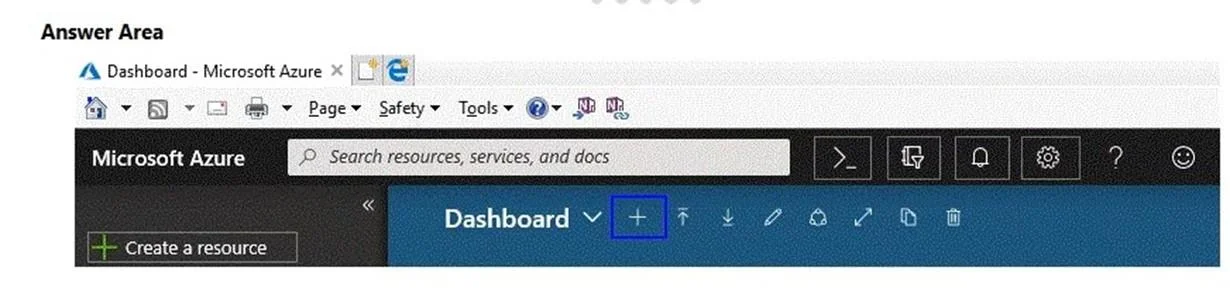
Hotspot Question You need to manage Azure by using Azure Cloud Shell. Which Azure portal icon should you select? To answer, select the appropriate icon in the answer area. Answer:
The correct answer is Which Azure portal icon should you select?: >_. The correct icon to select for launching Azure Cloud Shell is the 'greater than' symbol followed by an underscore ('>_'), located in the top global navigation bar of the Azure portal.
Question
Exhibit
Answer Area
- Which Azure portal icon should you select?>_Search resources, services, and docs>_?:)Dashboard+ Create a resource
Explanation
The correct icon to select for launching Azure Cloud Shell is the 'greater than' symbol followed by an underscore ('>_'), located in the top global navigation bar of the Azure portal.
Approach. To manage Azure using Azure Cloud Shell, the user must select the icon resembling a 'greater than' symbol followed by an underscore ('>_'). This icon is consistently used across the Azure portal's global navigation bar to launch the Cloud Shell environment, providing command-line access (Bash or PowerShell) directly within the browser.
Common mistakes.
- common_mistake. Other visible icons serve different purposes and are incorrect choices for launching Azure Cloud Shell. For example:
- '+ Create a resource' (left sidebar): This button is used to deploy new Azure resources, not to open a command-line interface.
- Bell icon (notifications): This displays recent notifications, alerts, and service health information.
- Gear icon (settings): This allows users to customize portal settings, themes, and dashboard layouts.
- Question mark icon (help): This provides access to help documentation, support requests, and troubleshooting guides.
- Smiley face icon (feedback): This is used to send feedback to Microsoft regarding the Azure portal experience. Selecting any of these would not open the Azure Cloud Shell and would therefore not fulfill the requirement of the question.
Concept tested. The core concept being tested is the test-taker's familiarity with the Azure portal interface, specifically the ability to locate and identify the correct icon for launching Azure Cloud Shell to perform management tasks. This demonstrates practical knowledge of Azure management tools and navigation within the portal.
Reference. https://learn.microsoft.com/en-us/azure/cloud-shell/overview
Topics
Community Discussion
No community discussion yet for this question.