
AZ-801 · Question #52
You have an Azure virtual machine named VM1 that has the Web Server (IIS) server role installed. VM1 hosts a critical line-of-business (LOB) application. After the security team at your company…
The correct answer is D. From the Azure portal, configure the Performance Diagnostics settings for VM1. To diagnose networking issues on an Azure VM suspected of being caused by a security baseline, the best approach is to use the Performance Diagnostics settings from the Azure portal to perform a network trace.
Question
Exhibit
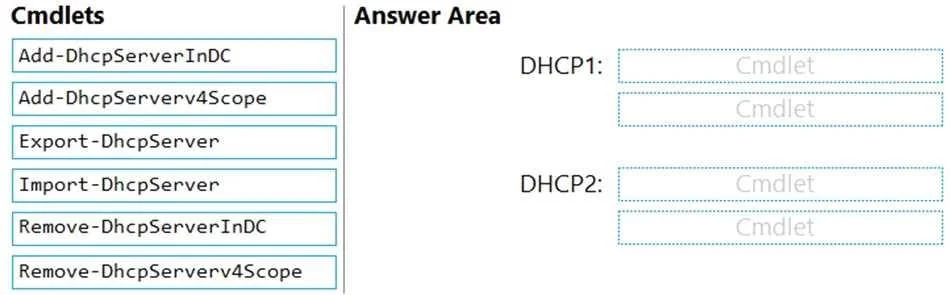
Options
- AFrom VM1, run nesscac
- BFrom Performance Monitor on VM1, create a Data Collector Set
- CFrom the Azure portal, configure the Diagnostics settings for VM1
- DFrom the Azure portal, configure the Performance Diagnostics settings for VM1
How the community answered
(27 responses)- A4% (1)
- B7% (2)
- C4% (1)
- D85% (23)
Why each option
To diagnose networking issues on an Azure VM suspected of being caused by a security baseline, the best approach is to use the Performance Diagnostics settings from the Azure portal to perform a network trace.
nesscac is a command-line tool for network tracing in Windows, but running it directly on the VM for a remote diagnosis of Azure VM network issues is not the most integrated or comprehensive Azure troubleshooting method.
Performance Monitor can collect performance data, but creating a Data Collector Set specifically for a network trace is a manual, in-guest process that doesn't leverage Azure's integrated diagnostic tools for remote troubleshooting of network issues.
Azure VM Diagnostics settings primarily collect guest OS metrics, logs, and crash dumps, but do not specifically provide an integrated network trace utility suitable for deep network issue investigation like Performance Diagnostics does.
Azure VM Performance Diagnostics includes the capability to run network traces and collect various performance data points to identify bottlenecks or issues. This feature provides a comprehensive way to analyze networking problems without direct interaction with the VM's console, which is ideal for troubleshooting network connectivity or application responsiveness issues. It leverages an extension that gathers data remotely and presents it in the Azure portal.
Concept tested: Azure VM network troubleshooting
Source: https://learn.microsoft.com/en-us/azure/virtual-machines/troubleshooting/performance-diagnostics
Topics
Community Discussion
No community discussion yet for this question.