
AZ-801 · Question #58
You have an Azure virtual machine named VM1. You install an application on VM1, and then restart the virtual machine. After the restart, you get the following error message: "Boot failure. Reboot…
The correct answer is A. az vm repair create. To troubleshoot an Azure VM boot failure by mounting its OS disk offline to a temporary VM, you should use the az vm repair create command.
Question
Exhibit
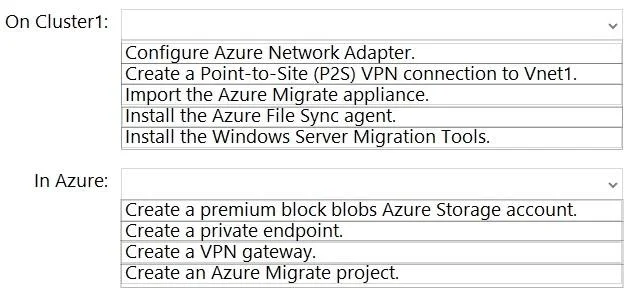
Options
- Aaz vm repair create
- Baz vm boot-diagnostics enable
- Caz vm capture
- Daz vm disk attach
How the community answered
(48 responses)- A71% (34)
- B4% (2)
- C17% (8)
- D8% (4)
Why each option
To troubleshoot an Azure VM boot failure by mounting its OS disk offline to a temporary VM, you should use the az vm repair create command.
The az vm repair create command in Azure CLI is specifically designed to create a repair virtual machine, attach the OS disk of the problematic VM to it, and automatically handle the necessary steps for troubleshooting. This command streamlines the process of mounting the OS disk offline to another VM for repair, allowing you to access the disk contents and troubleshoot boot issues effectively. It is the recommended approach for this scenario.
az vm boot-diagnostics enable enables boot diagnostics, which helps capture boot logs and screenshots, but it doesn't provide a mechanism to mount the OS disk offline to another VM for direct filesystem access.
az vm capture is used to generalize and create an image of a VM, which is not relevant for troubleshooting a boot failure by mounting its disk.
az vm disk attach can attach a data disk to a VM, but az vm repair create is the specific and recommended workflow to attach an OS disk from another VM for repair purposes, as it handles the creation of the temporary VM and disk attachment in one streamlined command.
Concept tested: Azure VM boot failure troubleshooting
Source: https://learn.microsoft.com/en-us/azure/virtual-machines/troubleshooting/repair-windows-vm-offline
Topics
Community Discussion
No community discussion yet for this question.