
AZ-800 · Question #62
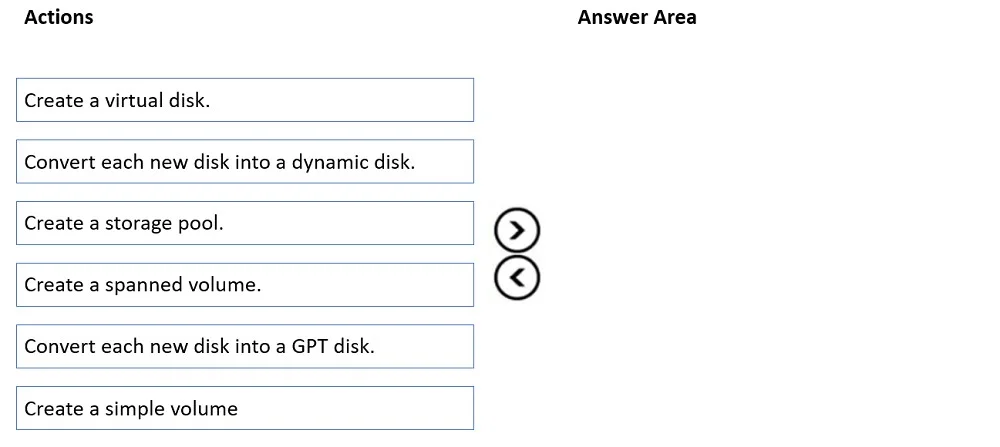
Drag and Drop Question You have a server named Server1. You plan to use Storage Spaces to expand the storage available to Server1. You attach eight physical disks to Server1. Four disks are HDDs and…
The correct answer is Create a storage pool.; Create a virtual disk.; Create a simple volume. To utilize Storage Spaces with performance tiering, you must first create a storage pool from physical disks, then create a virtual disk configured for tiering, and finally create a volume on that virtual disk.
Question
Exhibit
Answer Area
Drag items
Correct arrangement
- Create a storage pool.
- Create a virtual disk.
- Create a simple volume
Explanation
To utilize Storage Spaces with performance tiering, you must first create a storage pool from physical disks, then create a virtual disk configured for tiering, and finally create a volume on that virtual disk.
Approach. The scenario requires using Storage Spaces to combine eight physical disks (four HDDs and four SSDs) into a volume that offers the fastest read performance for frequently used files. This points directly to Storage Spaces with storage tiering. The correct sequence of actions for Storage Spaces is as follows:
- Create a storage pool: The first step in Storage Spaces is to group the available physical disks (HDDs and SSDs in this case) into a single logical entity called a storage pool. This aggregates their raw capacity.
- Create a virtual disk: From the storage pool, you then create one or more virtual disks. This is where you define parameters like the storage layout (simple, mirror, parity) and, critically for this scenario, enable storage tiers. By creating a virtual disk with storage tiers, the frequently accessed 'hot' data will automatically be moved to the faster SSDs, while 'cold' data resides on the HDDs, fulfilling the requirement for the fastest read performance.
- Create a simple volume: Once the virtual disk is created, a volume is then created on top of this virtual disk. This volume is formatted (e.g., NTFS or ReFS) and assigned a drive letter, making the storage accessible to the operating system and applications. The term 'simple volume' in this context refers to creating a single volume on the virtual disk, not to be confused with a 'simple volume' on a basic disk in traditional disk management.
Common mistakes.
- common_mistake. Common mistakes stem from confusing Storage Spaces with traditional disk management features or incorrect ordering of steps:
- 'Convert each new disk into a dynamic disk.' and 'Create a spanned volume.' are incorrect because Storage Spaces works with basic disks, not dynamic disks. Dynamic disks and spanned volumes are concepts from traditional Windows Disk Management that do not apply to Storage Spaces.
- 'Convert each new disk into a GPT disk.' is not one of the three primary steps in the Storage Spaces workflow. While disks must be initialized (MBR or GPT) to be recognized, Storage Spaces typically takes raw, unallocated basic disks and manages them. This action is either a prerequisite done beforehand or implicitly handled, but it's not a core sequential step in building the Storage Spaces structure itself, nor does it directly contribute to the performance tiering requirement compared to creating a virtual disk.
Concept tested. Windows Server Storage Spaces architecture, including the hierarchy of storage pools, virtual disks (storage spaces), and volumes, as well as the concept of storage tiering for performance optimization using different disk types (HDDs and SSDs).
Reference. null
Topics
Community Discussion
No community discussion yet for this question.