
AZ-800 · Question #239
SIMULATION You need to register SRV1 to sync Azure file shares. The registration must use the 12345678 Storage Sync Service. The required source files are located in a folder named…
The correct answer is A. Install the Azure File Sync agent. To register SRV1 for Azure file share synchronization, the Azure File Sync agent must first be installed on the server.
Question
SIMULATION You need to register SRV1 to sync Azure file shares. The registration must use the 12345678 Storage Sync Service. The required source files are located in a folder named \dc1.contoso.com\install. You do NOT need to configure file share synchronization at this time, and you do NOT need to update the agent. Answer:
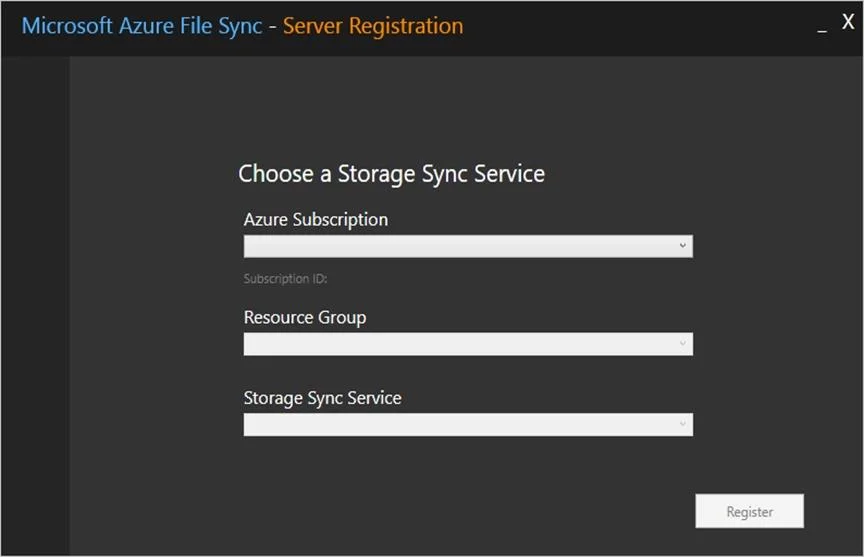
Install the Azure File Sync agent The Azure File Sync agent is a downloadable package that enables Windows Server to be synced with an Azure file share. Step 1: Browse to the folder folder named \dc1.contoso.com\install. Step 2: Double-click the MSI package located to start the Azure File Sync agent installation. Step 3: Complete the wizard. Register Windows Server with Storage Sync Service Registering your Windows Server with a Storage Sync Service establishes a trust relationship between your server (or cluster) and the Storage Sync Service. The Server Registration UI should open automatically after installation of the Azure File Sync agent. Step 4: When the Server Registration UI opens, select Sign-in to begin. After you sign in, you are prompted for the following information:
Azure Subscription: The subscription that contains the Storage Sync Service. Resource Group: The resource group that contains the Storage Sync Service. Storage Sync Service: The name of the Storage Sync Service with which you want to register. [Here 12345678] Step 5: Click Register. Reference:
https://learn.microsoft.com/en-us/azure/storage/file-sync/file-sync-deployment-guide
Exhibit
Options
- AInstall the Azure File Sync agent
How the community answered
(27 responses)- A100% (27)
Why each option
To register SRV1 for Azure file share synchronization, the Azure File Sync agent must first be installed on the server.
The Azure File Sync agent must be installed on a Windows Server to enable it to register with a Storage Sync Service and become an on-premises sync endpoint for Azure file shares.
Concept tested: Azure File Sync agent installation, server registration
Source: https://learn.microsoft.com/en-us/azure/storage/files/storage-sync-files-server-registration
Topics
Community Discussion
No community discussion yet for this question.