
AZ-800 · Question #232
Drag and Drop Question You have a server named Server1 that runs Windows Server and has the Active Directory Federation Services role installed. You plan to deploy Web Application Proxy to a server…
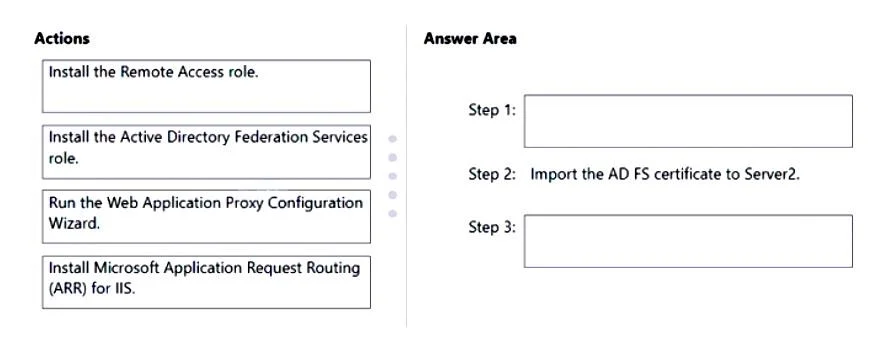
The correct answer is Install the Remote Access role.; Import the AD FS certificate to Server2.; Run the Web Application Proxy Configuration Wizard. To deploy Web Application Proxy (WAP) on Server2, the correct sequence involves installing the Remote Access role, importing the AD FS certificate, and then running the WAP Configuration Wizard.
Question
Drag and Drop Question You have a server named Server1 that runs Windows Server and has the Active Directory Federation Services role installed. You plan to deploy Web Application Proxy to a server named Server2. You export the Active Directory Federation Services (AD FS) certificate from Server1. Which actions should you perform on Server2 in sequence? To answer, drag the appropriate actions to the correct order. Each action may be used once, more than once, or not at all. You may need to drag the split bar between panes or scroll to view content. NOTE: Each correct selection is worth one point. Answer:
Exhibit
Answer Area
Drag items
Correct arrangement
- Install the Remote Access role.
- Import the AD FS certificate to Server2.
- Run the Web Application Proxy Configuration Wizard.
Explanation
To deploy Web Application Proxy (WAP) on Server2, the correct sequence involves installing the Remote Access role, importing the AD FS certificate, and then running the WAP Configuration Wizard.
Approach. The correct interaction is to drag 'Install the Remote Access role.' to Step 1 and 'Run the Web Application Proxy Configuration Wizard.' to Step 3. The process of deploying Web Application Proxy (WAP) requires the following sequential steps on the server designated for WAP (Server2 in this case): 1. WAP is a sub-role within the Remote Access role. Therefore, the first action is to install the 'Remote Access role', specifically selecting the 'Web Application Proxy' component during the role installation. 2. The AD FS certificate, which was exported from Server1 (the AD FS server), must be imported to Server2. This certificate is crucial for WAP to establish a secure connection with the AD FS farm and to publish applications. This step is pre-filled as 'Import the AD FS certificate to Server2.' 3. After the role is installed and the certificate is available, the WAP service needs to be configured. This is done by running the 'Web Application Proxy Configuration Wizard', which guides the user through connecting WAP to the AD FS farm and preparing it to publish applications.
Common mistakes.
- common_mistake. 1. 'Install the Active Directory Federation Services role.' is incorrect because Server1 already runs AD FS. Server2 is intended to be a Web Application Proxy, which proxies AD FS, it does not host AD FS itself. Installing AD FS on Server2 would either create a new AD FS farm or attempt to join an existing one, neither of which is the goal of deploying a WAP. 2. 'Install Microsoft Application Request Routing (ARR) for IIS.' is incorrect. While ARR is a reverse proxy technology, Web Application Proxy is a distinct Windows Server role designed specifically for AD FS and publishing web applications securely from inside a corporate network. WAP does not rely on a separate ARR installation for its core functionality.
Concept tested. The underlying technical concept being tested is the proper deployment and configuration sequence of the Web Application Proxy (WAP) role in a Windows Server environment, specifically its relationship with Active Directory Federation Services (AD FS) and certificate management.
Topics
Community Discussion
No community discussion yet for this question.