
AZ-500 · Question #5
Case Study 1 - Litware, Inc Overview Litware, Inc. is a digital media company that has 500 employees in the Chicago area and 20 employees in the San Francisco area. Existing Environment Litware has…
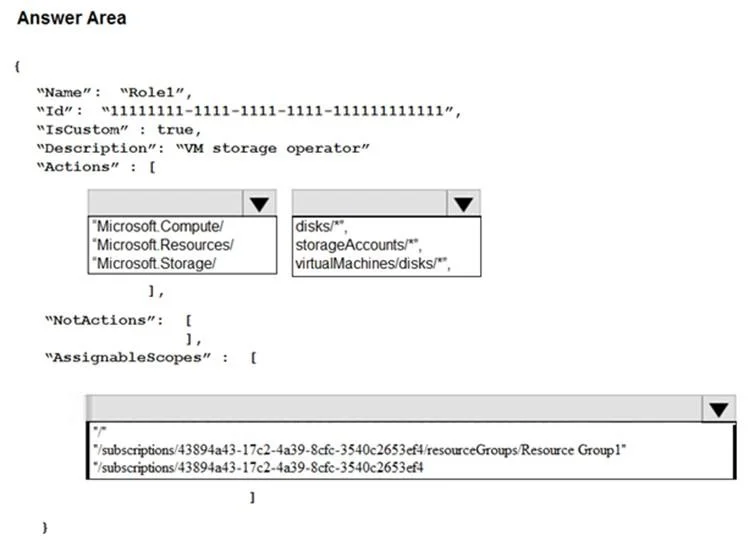
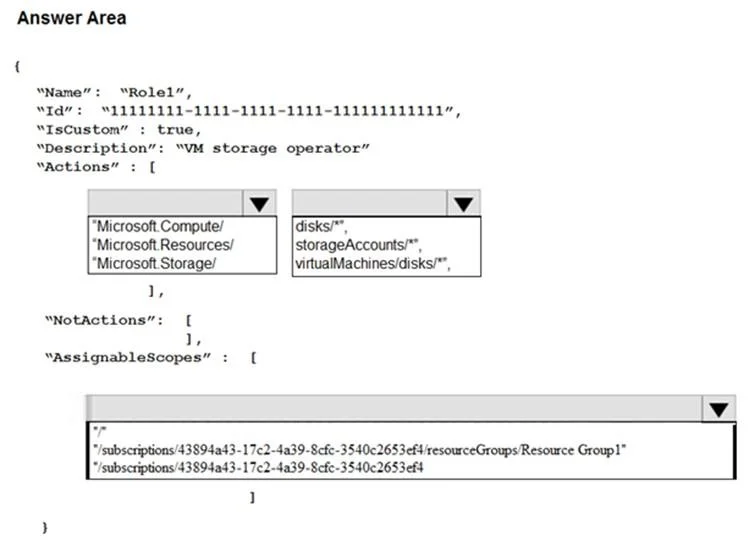
The correct answer is Actions: Resource Provider: Microsoft.Storage/; Actions: Resource Type/Action: virtualMachines/disks/*; Assignable Scopes: /subscriptions/43894a43-17c2-4a39-8cfc-3540c2653ef4. This hotspot question tests knowledge of Azure AD and Azure RBAC configurations required to meet Litware's identity and access requirements, including PIM assignments, group membership rules, and application registration restrictions.
Question
Exhibits
Answer Area
- Actions: Resource ProviderMicrosoft.Storage/Microsoft.Compute/Microsoft.Resources/Microsoft.Storage/
- Actions: Resource Type/ActionvirtualMachines/disks/*disks/*storageAccounts/*virtualMachines/disks/*
- Assignable Scopes/subscriptions/43894a43-17c2-4a39-8cfc-3540c2653ef4//subscriptions/43894a43-17c2-4a39-8cfc-3540c2653ef4/resourceGroups/Resource Group1/subscriptions/43894a43-17c2-4a39-8cfc-3540c2653ef4
Explanation
This hotspot question tests knowledge of Azure AD and Azure RBAC configurations required to meet Litware's identity and access requirements, including PIM assignments, group membership rules, and application registration restrictions.
Approach. For the San Francisco users/devices in Group1, a dynamic membership rule should be used (e.g., based on location attribute), making it a Dynamic group. For Group2's Contributor role on Resource Group2, PIM's 'permanent eligible' assignment means the assignment never expires but users must still activate it - this is configured in PIM as an eligible assignment with no end date. To prevent users from registering applications, the Azure AD tenant setting 'Users can register applications' must be set to 'No' under Azure AD > User Settings, which restricts app registration to administrators only.
Concept tested. Azure AD group types (dynamic vs assigned), Azure AD Privileged Identity Management (PIM) eligible vs active and permanent vs time-bound assignments, and Azure AD user settings for application registration restrictions.
Reference. https://learn.microsoft.com/en-us/azure/active-directory/privileged-identity-management/pim-resource-roles-assign-roles and https://learn.microsoft.com/en-us/azure/active-directory/fundamentals/users-default-permissions
Topics
Community Discussion
No community discussion yet for this question.