
AZ-500 · Question #434
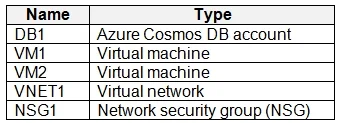
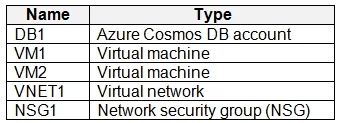
You have an Azure subscription that contains the resources shown in the following table. Both VM1 and VM2 connect to VNET1 and are configured to use NSG1. You need to ensure that only VM1 and VM2…
The correct answer is D. Configure DB1 to allow access from only VNET1. To ensure only VM1 and VM2 (residing in VNET1) can access DB1, you should configure DB1's network access controls to exclusively allow connections originating from VNET1.
Question
Exhibits
Options
- AFor NSG1, configure a rule that has a service tag.
- BAdd the IP address range of VNET1 to the Firewall settings of DB1.
- CCreate an application security group.
- DConfigure DB1 to allow access from only VNET1.
How the community answered
(51 responses)- A2% (1)
- B12% (6)
- C6% (3)
- D80% (41)
Why each option
To ensure only VM1 and VM2 (residing in VNET1) can access DB1, you should configure DB1's network access controls to exclusively allow connections originating from VNET1.
Configuring NSG1 controls inbound/outbound traffic for the VMs or subnets it's applied to, not the inbound access rules for a separate database service (DB1) itself.
While adding VNET1's IP address range to DB1's firewall could technically work, configuring DB1 to allow access from VNET1 generally implies using more robust and secure Azure VNet integration features like Service Endpoints or Private Link, which provide more controlled and private access.
Application Security Groups are used with Network Security Groups to define security policies for groups of virtual machines, but they do not directly configure the access controls for an Azure database service.
Azure PaaS databases, such as Azure SQL Database, provide network security features like Virtual Network rules or private endpoints. By configuring DB1 to allow access *only* from VNET1, all traffic originating from within that virtual network, including from VM1 and VM2, will be permitted while blocking all other external connections.
Concept tested: Azure PaaS database network security and VNet integration
Source: https://learn.microsoft.com/en-us/azure/azure-sql/database/vnet-service-endpoint-rule-overview
Topics
Community Discussion
No community discussion yet for this question.