
AZ-500 · Question #433
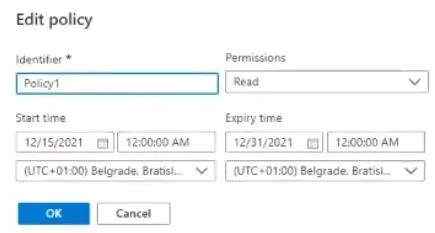
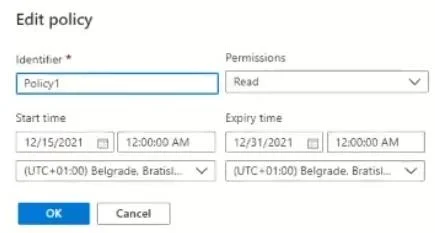
Hotspot Question You have an Azure subscription that contains two users named User1 and User2 and the blob containers shown in the following table. Policy1 is configured as shown in the following…
The correct answer is When using SAS1, User1 can write to container2 on December 5, 2021. = No; When using SAS1, User2 can write to container1 on December 20, 2021. = Yes; When using SAS1, User1 can read from container2 on January 10, 2022. = No. Here's a breakdown of each statement: 1. When using SAS1, User1 can write to container2 on December 5, 2021. => No The Shared Access Signature (SAS) named SAS1 has a start date of December 11, 2021. On December 5, 2021, SAS1 has not yet become active. Therefore, User1 cannot…
Question
Exhibits
Answer Area
- When using SAS1, User1 can write to container2 on December 5, 2021.No
- When using SAS1, User2 can write to container1 on December 20, 2021.Yes
- When using SAS1, User1 can read from container2 on January 10, 2022.No
Explanation
Here's a breakdown of each statement:
-
When using SAS1, User1 can write to container2 on December 5, 2021. => No
- The Shared Access Signature (SAS) named SAS1 has a start date of December 11, 2021. On December 5, 2021, SAS1 has not yet become active. Therefore, User1 cannot use SAS1 to perform any actions, including writing to container2, on this date.
-
When using SAS1, User2 can write to container1 on December 20, 2021. => Yes
- SAS1 is valid from December 11, 2021, to January 4, 2022. December 20, 2021, falls within this validity period.
- SAS1 explicitly lists "Write" as an allowed permission.
- While
container1is associated withPolicy1(which grants 'Read' permissions and is valid on this date), the question does not state thatSAS1referencesPolicy1. Unless explicitly linked, a SAS uses its own defined permissions and validity period independently of any stored access policies on the container. Therefore,SAS1's 'Write' permission is effective. - User2's Azure RBAC role (Contributor) is irrelevant here, as the question specifies "When using SAS1," meaning authorization is determined by the SAS itself.
- Since SAS1 is valid and grants 'Write' permission, User2 can write to
container1using SAS1.
-
When using SAS1, User1 can read from container2 on January 10, 2022. => No
- The Shared Access Signature (SAS) named SAS1 has an expiry date of January 4, 2022. On January 10, 2022, SAS1 has already expired. Therefore, User1 cannot use SAS1 to perform any actions, including reading from container2, on this date.
Topics
Community Discussion
No community discussion yet for this question.