
AZ-500 · Question #419
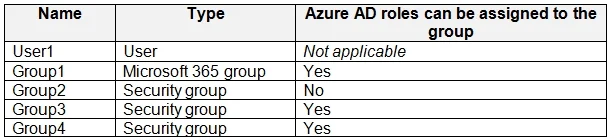
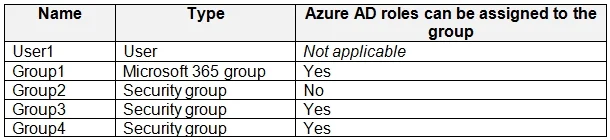
You have an Azure subscription that contains a resource group named RG1 and the identities shown in the following table. You assign Group4 the Contributor role for RG1. Which identities can you add…
The correct answer is A. User1 only. Explanation Option A is correct because in Microsoft Entra ID (Azure AD), Microsoft 365 groups cannot contain other groups as members - only users can be added as members of a Microsoft 365 group. Based on the table (which typically shows Group4 as a Microsoft 365 group, and…
Question
Exhibits
Options
- AUser1 only
- BUser1 and Group3 only
- CUser1, Group1, and Group3 only
- DUser1, Group2, and Group3 only
- EUser1, Group1, Group2, and Group3
How the community answered
(29 responses)- A83% (24)
- B3% (1)
- C7% (2)
- E7% (2)
Explanation
Explanation
Option A is correct because in Microsoft Entra ID (Azure AD), Microsoft 365 groups cannot contain other groups as members - only users can be added as members of a Microsoft 365 group. Based on the table (which typically shows Group4 as a Microsoft 365 group, and Group1/Group2 as Microsoft 365 groups, while Group3 is a Security group), only User1 can be added since nested group membership is restricted for Microsoft 365 groups.
Why the distractors are wrong:
- B, C, D, and E are incorrect because they all include various groups (Group1, Group2, or Group3) as members of Group4. Microsoft 365 groups do not support group nesting - you cannot add any group type as a member of a Microsoft 365 group, regardless of whether the nested group is a Security group or another Microsoft 365 group.
Memory Tip: Think of Microsoft 365 groups as "users only" clubs - they are designed for collaboration tools like Teams and Outlook, and Microsoft keeps them simple by allowing only users (and service principals/devices) as members, never other groups. If the group were a Security group, nesting would be allowed - so always check the group type first on exam questions!
Topics
Community Discussion
No community discussion yet for this question.