
AZ-500 · Question #413
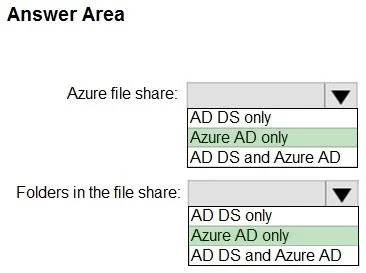
Hotspot Question You have an Azure Active directory tenant that syncs with an Active Directory Domain Services (AD DS) domain. You plan to create an Azure file share that will contain folders and…
The correct answer is Azure file share:: Azure AD only; Folders in the file share:: Azure AD only. This question tests knowledge of which identity stores can be used to assign permissions at the share level versus the folder/file level in Azure Files when using AD DS sync with Azure AD.
Question
Exhibit
Answer Area
- Azure file share:Azure AD onlyAD DS onlyAzure AD onlyAD DS and Azure AD
- Folders in the file share:Azure AD onlyAD DS onlyAzure AD onlyAD DS and Azure AD
Explanation
This question tests knowledge of which identity stores can be used to assign permissions at the share level versus the folder/file level in Azure Files when using AD DS sync with Azure AD.
Approach. For share-level permissions (RBAC), you can use Azure Active Directory (Azure AD) identities because Azure RBAC roles like 'Storage File Data SMB Share Contributor' are assigned via Azure AD. For folder and file-level permissions (NTFS/ACLs), you must use Active Directory Domain Services (AD DS) identities, because NTFS-level permissions within the share are enforced using the on-premises AD DS identities synced to Azure AD - the Kerberos authentication for granular NTFS permissions relies on the AD DS domain. In summary: Share-level = Azure AD; Folder/File-level = AD DS (on-premises Active Directory).
Concept tested. Azure Files supports a two-layer permission model: share-level permissions are managed through Azure RBAC (using Azure AD identities), while directory and file-level permissions are managed through Windows ACLs/NTFS permissions (using AD DS identities). When AD DS is synced with Azure AD, the hybrid identity model allows Kerberos authentication via AD DS for SMB access, but RBAC share-level assignments still go through Azure AD.
Topics
Community Discussion
No community discussion yet for this question.