
AZ-500 · Question #385
Hotspot Question You have an Azure Active Directory (Azure AD) tenant named contoso.com that has Azure Active Directory Premium Plan 1 licenses. You need to create a group named Group1 that will be…
This question tests knowledge of where and how to create role-assignable groups in Azure AD, specifically groups that can be assigned Azure AD directory roles like Global Reader.
Question
Exhibit
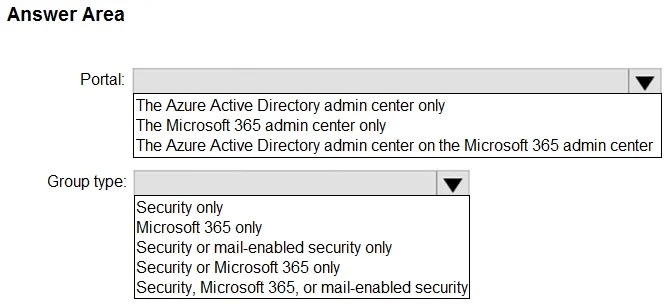
Answer Area
- Portal:The Azure Active Directory admin center onlyThe Microsoft 365 admin center onlyThe Azure Active Directory admin center on the Microsoft 365 admin center
- Group type:Security onlyMicrosoft 365 onlySecurity or mail-enabled security onlySecurity or Microsoft 365 onlySecurity, Microsoft 365, or mail-enabled security
Explanation
This question tests knowledge of where and how to create role-assignable groups in Azure AD, specifically groups that can be assigned Azure AD directory roles like Global Reader.
Approach. You must use the Azure Active Directory portal (portal.azure.com > Azure Active Directory blade) to create Group1, NOT the Microsoft 365 admin center, because role-assignable groups require specific settings only available in the AAD portal. The group type must be 'Security' (not Microsoft 365) because only Security groups can be assigned Azure AD roles. Additionally, when creating the group, the 'Azure AD roles can be assigned to the group' toggle must be enabled - this option requires Azure AD Premium P1 or P2, which is already available in this scenario. Microsoft 365 groups cannot be used for Azure AD role assignments, and the Microsoft 365 Admin Center does not expose the role-assignable group option.
Concept tested. Azure AD role-assignable groups require: (1) creation via the Azure Active Directory portal, (2) Security group type, and (3) the 'Azure AD roles can be assigned to the group' setting enabled at creation time (immutable after creation). This feature requires Azure AD Premium P1 or higher.
Reference. https://learn.microsoft.com/en-us/azure/active-directory/roles/groups-concept
Topics
Community Discussion
No community discussion yet for this question.