
AZ-500 · Question #382
You have an Azure subscription that contains an Azure SQL Database logic server named SQL1 and an Azure virtual machine named VM1. VM1 uses a private IP address only. The Firewall and virtual…
The correct answer is A. Add an existing virtual network. The Azure SQL Database firewall allows you to specify IP address ranges from which communications are accepted into SQL Database. This approach is fine for stable IP addresses that are outside the Azure private network. However, virtual machines (VMs) within the Azure private…
Question
Exhibits
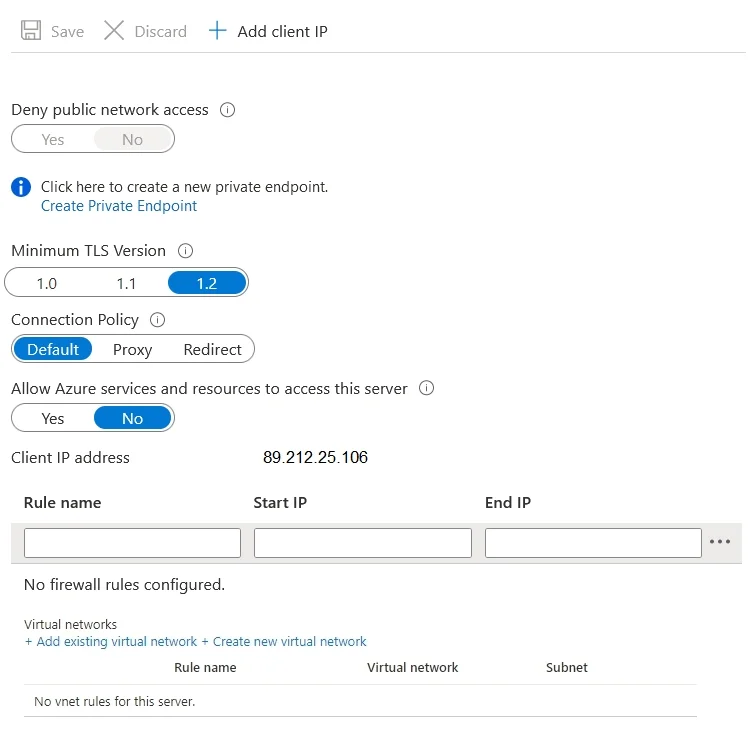
Options
- AAdd an existing virtual network.
- BSet Connection Policy to Proxy.
- CCreate a new firewall rule.
- DSet Allow Azure services and resources to access this server to Yes.
How the community answered
(16 responses)- A81% (13)
- B6% (1)
- C13% (2)
Explanation
The Azure SQL Database firewall allows you to specify IP address ranges from which communications are accepted into SQL Database. This approach is fine for stable IP addresses that are outside the Azure private network. However, virtual machines (VMs) within the Azure private network are configured with dynamic IP addresses. Dynamic IP addresses can change when your VM is restarted and in turn invalidate the IP-based firewall rule. It would be folly to specify a dynamic IP address in a firewall rule, in a production environment. You can work around this limitation by obtaining a static IP address for your VM. For details, see Create a virtual machine with a static public IP address using the Azure portal. However, the static IP approach can become difficult to manage, and it's costly when done at scale. Virtual network rules are easier alternative to establish and to manage access from a specific subnet that contains your VMs.
Community Discussion
No community discussion yet for this question.