
AZ-500 · Question #34
You have a hybrid configuration of Azure Active Directory (Azure AD). All users have computers that run Windows 10 and are hybrid Azure AD joined. You have an Azure SQL database that is configured…
The correct answer is C. Active Directory - Integrated. Active Directory - Integrated is correct because it leverages the user's existing Windows session credentials (established at login) to silently authenticate against Azure AD via the hybrid join trust relationship - meaning developers are never prompted for credentials when…
Question
Exhibit
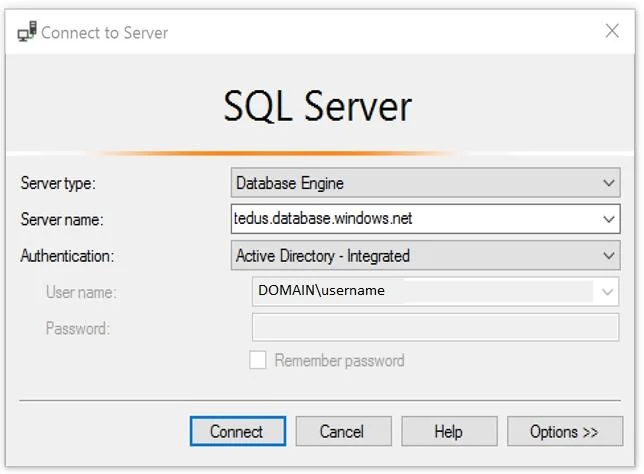
Options
- ASQL Login
- BActive Directory - Universal with MFA support
- CActive Directory - Integrated
- DActive Directory - Password
How the community answered
(53 responses)- A2% (1)
- B9% (5)
- C85% (45)
- D4% (2)
Explanation
Active Directory - Integrated is correct because it leverages the user's existing Windows session credentials (established at login) to silently authenticate against Azure AD via the hybrid join trust relationship - meaning developers are never prompted for credentials when connecting through SSMS, perfectly satisfying the "minimize authentication prompts" requirement.
Why the distractors are wrong:
- A. SQL Login uses a separate username/password stored in the database, which is not tied to their AD account and requires manual credential entry every time.
- B. Active Directory - Universal with MFA supports Multi-Factor Authentication, which by design introduces additional prompts - the opposite of what's needed here.
- D. Active Directory - Password does use their AD credentials, but still requires the user to manually type their username and password each time, generating unnecessary prompts.
Memory Tip: Think of "Integrated" as meaning integrated with Windows - just like how you don't re-enter credentials to access shared network drives at work, Integrated authentication "integrates" your current Windows login session, making it completely seamless and prompt-free. If a question mentions hybrid AD join + minimizing prompts, Integrated = Invisible login.
Topics
Community Discussion
No community discussion yet for this question.