
AZ-500 · Question #303
Hotspot Question You have an Azure subscription that contains a user named User1 and a storage account named storage1. The storage1 account contains the resources shown in the following table. User1…
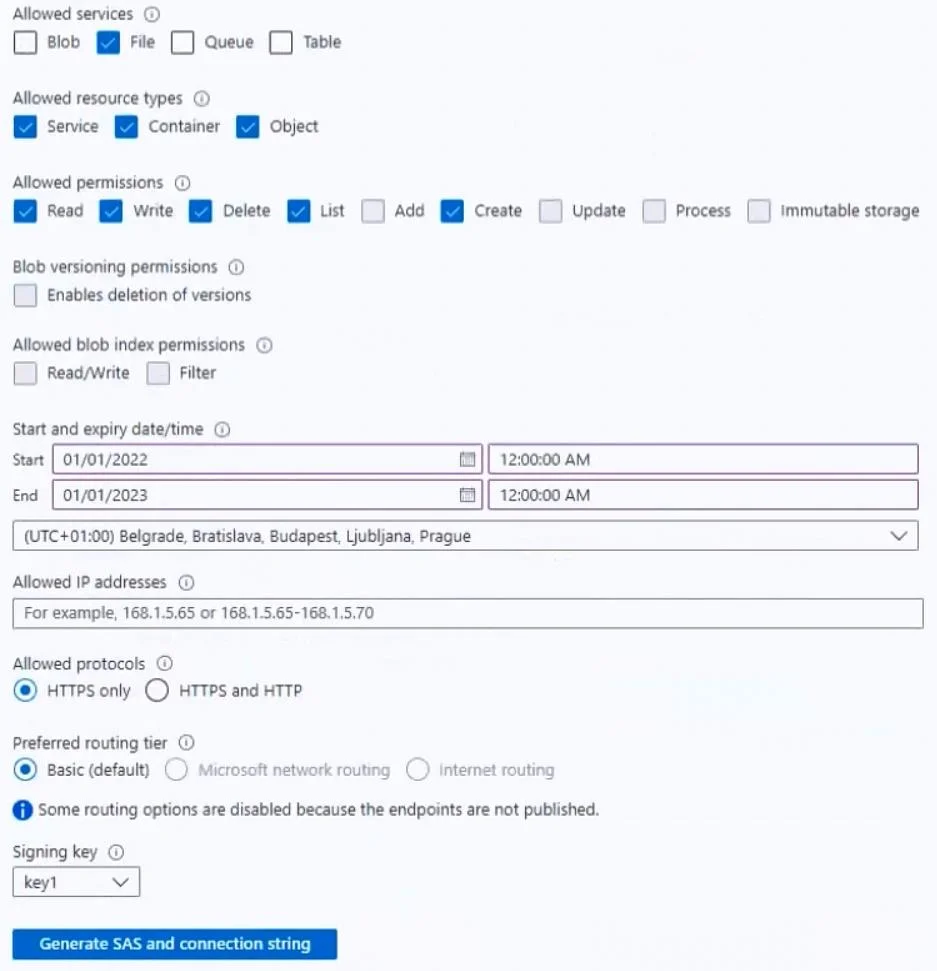
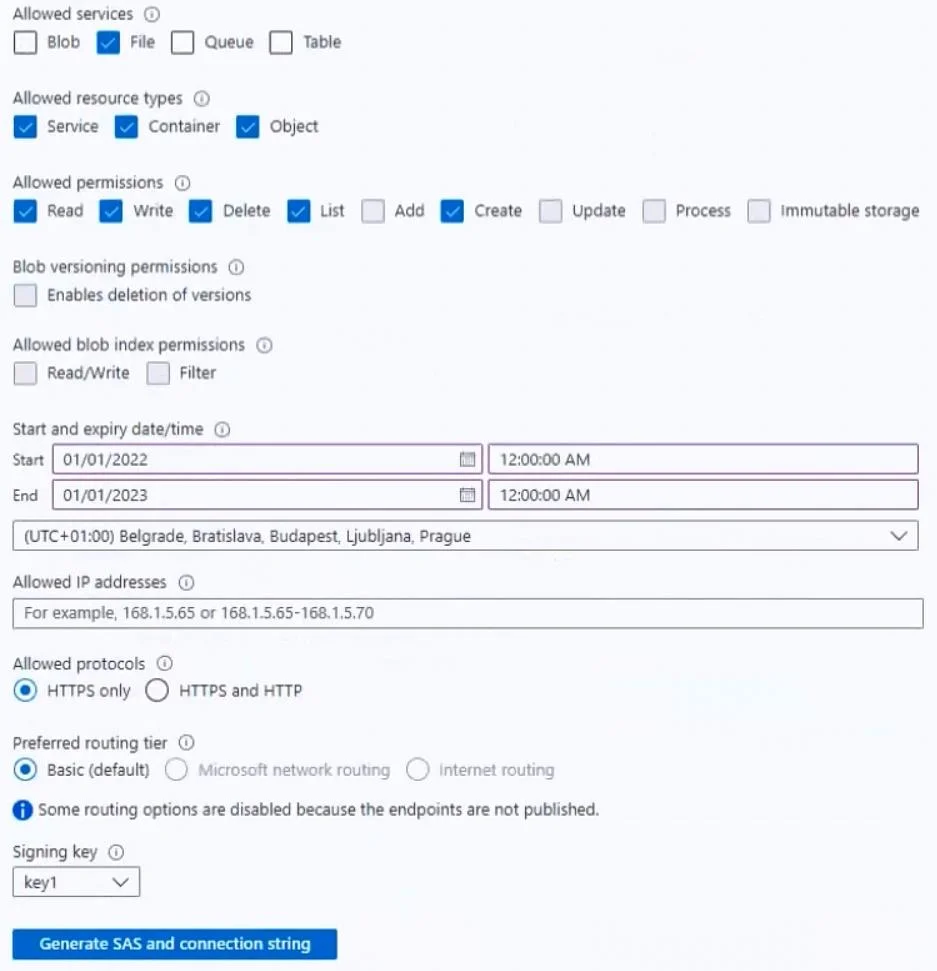
The correct answer is On October 1, 2022, if User1 accesses folder1 by using SAS1, he can delete the files in folder1. = Yes; On October 1, 2022, if User1 maps folder1 as a network drive by using his Azure AD credentials, he can delete the files in folder1. = No; On October 1, 2022, User1 can delete the rows in table1 by using SAS1. = No. Here's the breakdown: 1. On October 1, 2022, if User1 accesses folder1 by using SAS1, he can delete the files in folder1. => Yes The Shared Access Signature (SAS1) is valid from January 1, 2022, to January 1, 2023, so October 1, 2022, is within its validity period. The SAS1…
Question
Exhibits
Answer Area
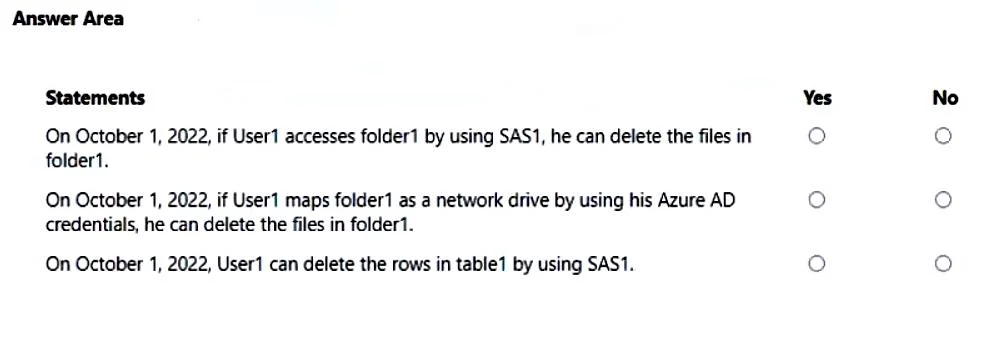
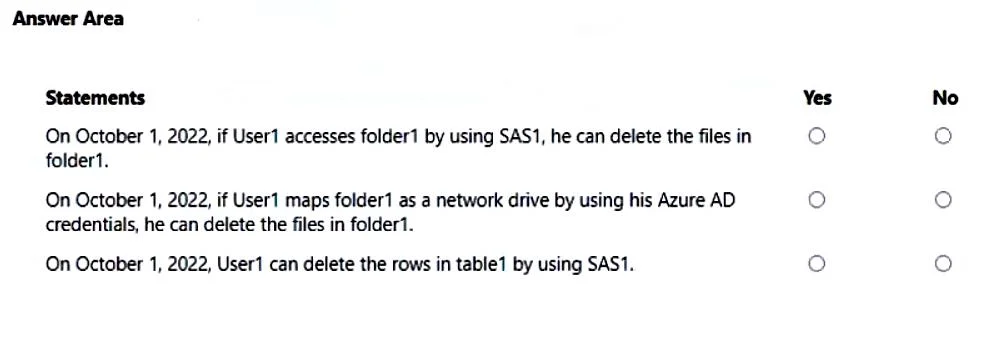
- On October 1, 2022, if User1 accesses folder1 by using SAS1, he can delete the files in folder1.Yes
- On October 1, 2022, if User1 maps folder1 as a network drive by using his Azure AD credentials, he can delete the files in folder1.No
- On October 1, 2022, User1 can delete the rows in table1 by using SAS1.No
Explanation
Here's the breakdown:
-
On October 1, 2022, if User1 accesses folder1 by using SAS1, he can delete the files in folder1. => Yes
- The Shared Access Signature (SAS1) is valid from January 1, 2022, to January 1, 2023, so October 1, 2022, is within its validity period.
- The SAS1 configuration (as shown in the exhibit) explicitly allows the "File" service and has the "Delete" permission checked. When accessing via SAS, the SAS permissions override User1's RBAC roles. Therefore, User1 can delete files in
folder1.
-
On October 1, 2022, if User1 maps folder1 as a network drive by using his Azure AD credentials, he can delete the files in folder1. => No
- When User1 accesses
folder1using Azure AD credentials, their Azure RBAC roles apply. User1 is assigned theStorage File Data SMB Share Readerrole forstorage1. - This role only grants read access to file shares, not delete permissions. To delete files, a role like
Storage File Data SMB Share Contributorwould be required. Therefore, User1 cannot delete files.
- When User1 accesses
-
On October 1, 2022, User1 can delete the rows in table1 by using SAS1. => No
- The official explanation states that "SAS only gives File permission, not Table." Although the SAS exhibit shows both "Table" service and "Delete" permission generally checked, this specific SAS (SAS1) is interpreted as not granting delete permissions for tables. Therefore, User1 cannot delete rows in
table1using SAS1.
- The official explanation states that "SAS only gives File permission, not Table." Although the SAS exhibit shows both "Table" service and "Delete" permission generally checked, this specific SAS (SAS1) is interpreted as not granting delete permissions for tables. Therefore, User1 cannot delete rows in
Topics
Community Discussion
No community discussion yet for this question.