
AZ-500 · Question #304
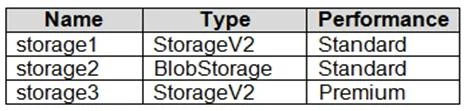
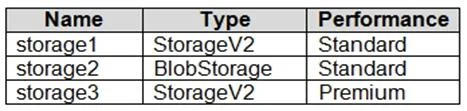
Hotspot Question You have an Azure subscription that contains three storage accounts, an Azure SQL managed instance named SQL1, and three Azure SQL databases. The storage accounts are configured as…
The correct answer is Audit events for DB1 are written to storage1. = Yes; Audit events for DB2 are written to storage1 and storage2. = Yes; Storage3 can be used as an audit log destination for DB3. = No. In Azure SQL Managed Instance, when a database does not have its own auditing configured, it inherits the auditing settings from the managed instance (SQL1), which writes to storage1 - so DB1 (no custom auditing) inherits SQL1's setting and writes to storage1. DB2 has its own…
Question
Exhibits


Answer Area
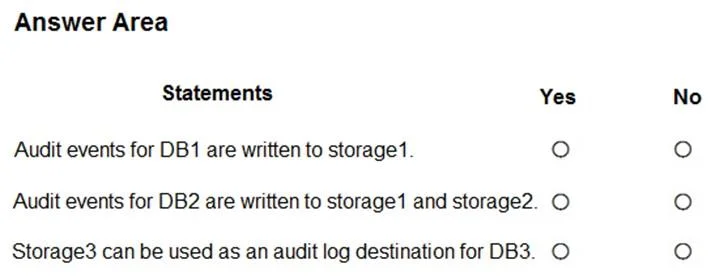
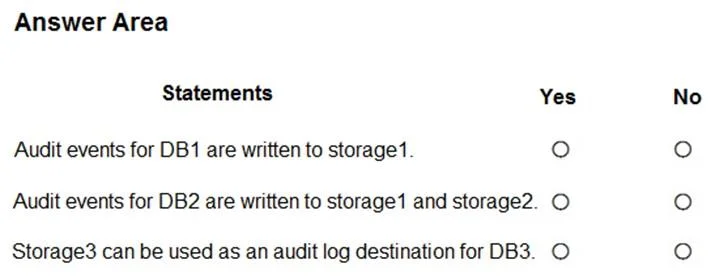
- Audit events for DB1 are written to storage1.Yes
- Audit events for DB2 are written to storage1 and storage2.Yes
- Storage3 can be used as an audit log destination for DB3.No
Explanation
In Azure SQL Managed Instance, when a database does not have its own auditing configured, it inherits the auditing settings from the managed instance (SQL1), which writes to storage1 - so DB1 (no custom auditing) inherits SQL1's setting and writes to storage1. DB2 has its own auditing configured to storage2, but because SQL1's server-level auditing is also active and points to storage1, audit events are written to BOTH storage1 (inherited server-level) and storage2 (database-level) - this is by design in Azure SQL auditing where server and database level auditing coexist. Storage3 cannot be used as an audit log destination for DB3 because storage3 is configured with a hierarchical namespace (Azure Data Lake Storage Gen2), which is not supported as an audit log destination for Azure SQL - only standard Azure Blob Storage is supported.
Topics
Community Discussion
No community discussion yet for this question.