
AZ-500 · Question #23
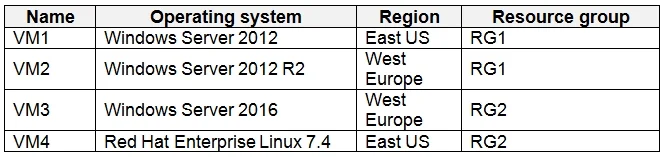
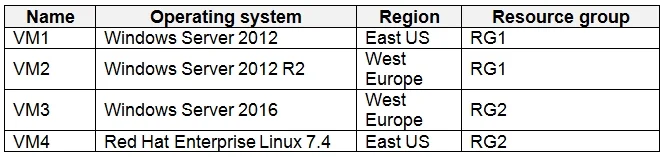
You have an Azure virtual machines shown in the following table. You create an Azure Log Analytics workspace named Analytics1 in RG1 in the East US region. Which virtual machines can be enrolled in…
The correct answer is C. VM1, VM2, VM3, and VM4. Explanation Option C is correct because Azure Log Analytics workspaces can collect data from virtual machines regardless of their region, resource group, or operating system - a VM in West US, a different resource group, or running Linux can all be enrolled in the same…
Question
Exhibits
Options
- AVM1 only
- BVM1, VM2, and VM3 only
- CVM1, VM2, VM3, and VM4
- DVM1 and VM4 only
How the community answered
(38 responses)- A3% (1)
- B3% (1)
- C89% (34)
- D5% (2)
Explanation
Explanation
Option C is correct because Azure Log Analytics workspaces can collect data from virtual machines regardless of their region, resource group, or operating system - a VM in West US, a different resource group, or running Linux can all be enrolled in the same workspace. The workspace acts as a centralized data collection point, and there is no geographic or resource group restriction on which VMs can send data to it.
Why the distractors are wrong:
- Option A (VM1 only) incorrectly implies only VMs in the same region (East US) or resource group (RG1) can be enrolled - this restriction does not exist.
- Option B (VM1, VM2, VM3 only) likely excludes VM4 due to it being in a different region or subscription tier, but cross-region enrollment is fully supported.
- Option D (VM1 and VM4 only) arbitrarily excludes certain VMs, which doesn't align with how Log Analytics connectivity actually works.
Memory Tip: Think of Log Analytics as a universal inbox - it doesn't care where your VMs live (region, resource group, or OS). As long as the Log Analytics agent (MMA/AMA) is installed and the VM has network connectivity to the workspace endpoint, it can send data. "Any VM, anywhere" = Log Analytics.
Topics
Community Discussion
No community discussion yet for this question.