
AZ-500 · Question #221
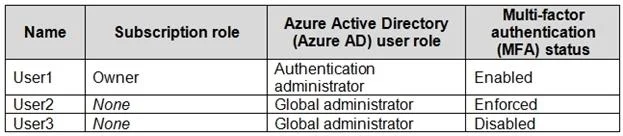
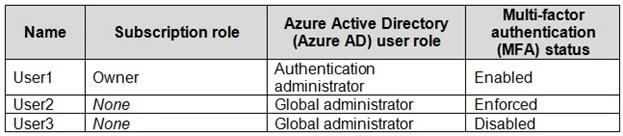
You have an Azure subscription that contains the users shown in the following table. Which users can enable Azure AD Privileged Identity Management (PIM)?
The correct answer is D. User1 only. Explanation Only User1 (Global Administrator) can enable Azure AD Privileged Identity Management, because PIM can only be activated by someone holding the Global Administrator role in Azure Active Directory - this is a strict prerequisite enforced by Microsoft. User2 and User3…
Question
Exhibits
Options
- AUser2 and User3 only
- BUser1 and User2 only
- CUser2 only
- DUser1 only
How the community answered
(41 responses)- A2% (1)
- C2% (1)
- D95% (39)
Explanation
Explanation
Only User1 (Global Administrator) can enable Azure AD Privileged Identity Management, because PIM can only be activated by someone holding the Global Administrator role in Azure Active Directory - this is a strict prerequisite enforced by Microsoft. User2 and User3 (typically shown as having lesser roles such as Security Administrator or User Administrator) lack the necessary permissions to enable PIM, making options A, B, and C incorrect; while Security Administrators can manage PIM after it's enabled, they cannot enable it initially. The distinction here is critical: enabling PIM for the first time is a one-time setup action reserved exclusively for Global Admins, whereas day-to-day PIM management can be delegated afterward.
Memory Tip: Think of enabling PIM like "turning on the master switch" - only the highest authority (Global Administrator) can flip it on, but once it's running, others can help manage it. Remember: "Enable = Global Admin only."
Topics
Community Discussion
No community discussion yet for this question.