
AZ-500 · Question #188
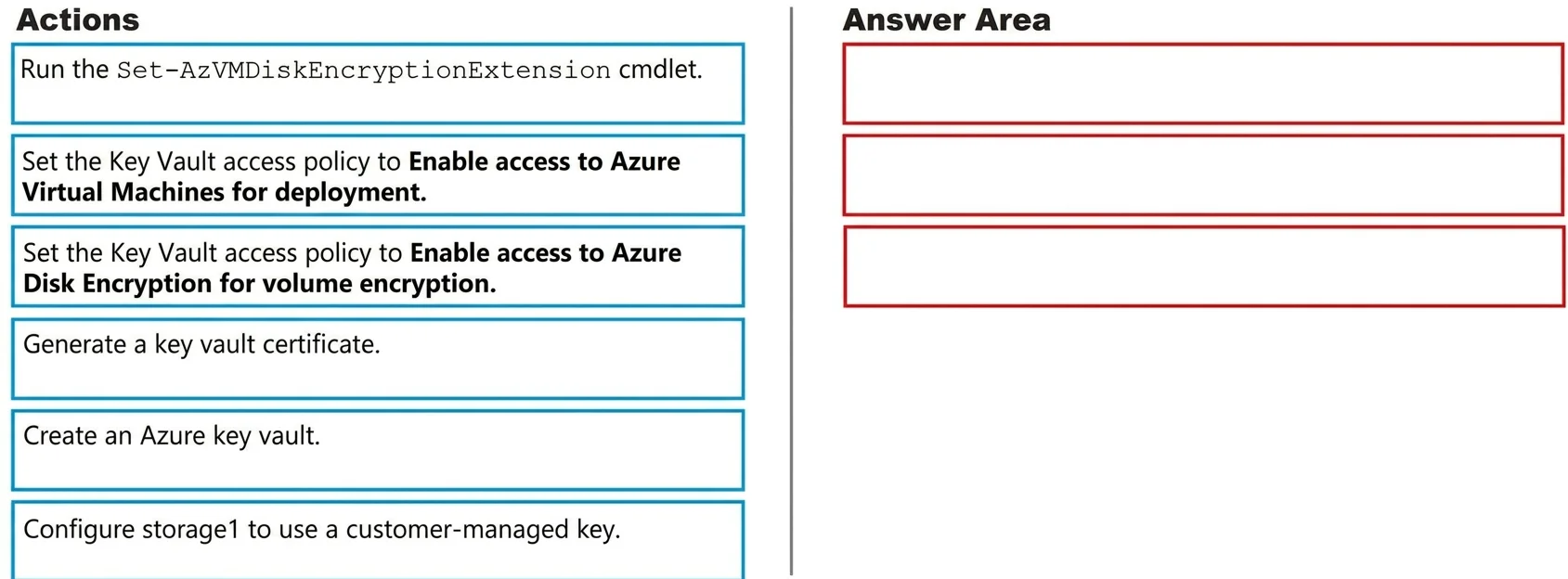
Drag and Drop Question You have an Azure Storage account named storage1 and an Azure virtual machine named VM1. VM1 has a premium SSD managed disk. You need to enable Azure Disk Encryption for VM1…
The correct answer is Create an Azure key vault.; Set the Key Vault access policy to Enable access to Azure Virtual Machines for deployment.; Run the Set-AzVMDiskEncryptionExtension cmdlet. Azure Disk Encryption - Sequence Explanation The Correct Order 1. Create an Azure Key Vault Azure Disk Encryption (ADE) requires a Key Vault to store the encryption keys (BitLocker keys on Windows, passphrase on Linux). There is no encryption without a vault to hold the keys…
Question
Exhibit
Answer Area
Drag items
Correct arrangement
- Create an Azure key vault.
- Set the Key Vault access policy to Enable access to Azure Virtual Machines for deployment.
- Run the Set-AzVMDiskEncryptionExtension cmdlet.
Explanation
Azure Disk Encryption - Sequence Explanation
The Correct Order
1. Create an Azure Key Vault
Azure Disk Encryption (ADE) requires a Key Vault to store the encryption keys (BitLocker keys on Windows, passphrase on Linux). There is no encryption without a vault to hold the keys - this is the mandatory prerequisite. Everything else depends on this existing first.
2. Set the Key Vault access policy to "Enable access to Azure Virtual Machines for deployment"
ADE needs the VM (specifically the VM agent) to be able to retrieve secrets from the Key Vault at boot time. This access policy grants the Azure VM platform permission to access the vault. Without it, the encryption extension cannot retrieve or store the disk encryption key, and the cmdlet in step 3 will fail.
3. Run the Set-AzVMDiskEncryptionExtension cmdlet
This is the actual enablement step. It installs the ADE extension on the VM, encrypts the disk(s), and stores the encryption key in the Key Vault. It must come last because the vault and its permissions must already be in place.
Why the Distractors Are Wrong
| Distractor | Why it's wrong |
|---|---|
| "Enable access to Azure Disk Encryption for volume encryption" | This policy is for Azure Key Vault itself (e.g., used with Key Encryption Keys/KEK scenarios) - not required for basic ADE enablement. |
| "Enable access to Azure Disk Encryption for deployment" | This is for Azure Resource Manager to retrieve secrets when deploying resources, not for ADE on a running VM. |
| "Generate a key vault certificate" | Certificates are for VM deployment secrets, not disk encryption. ADE uses keys/secrets, not certificates. |
| "Configure storage1 to use a customer-managed key" | This is Storage Service Encryption (SSE) for the storage account - a completely different feature from ADE on a managed disk. |
Key Misconception to Avoid
Many candidates confuse Azure Disk Encryption (ADE) with Storage Service Encryption (SSE). ADE encrypts at the OS level (BitLocker/DM-Crypt) and requires Key Vault + VM access policy. SSE encrypts at the storage layer and is configured on the storage account - the storage1 reference in the question is a deliberate distractor pointing you toward SSE, which is irrelevant here.
Topics
Community Discussion
No community discussion yet for this question.