
AZ-500 · Question #168
You are troubleshooting a security issue for an Azure Storage account. You enable the diagnostic logs for the storage account. What should you use to retrieve the diagnostics logs?
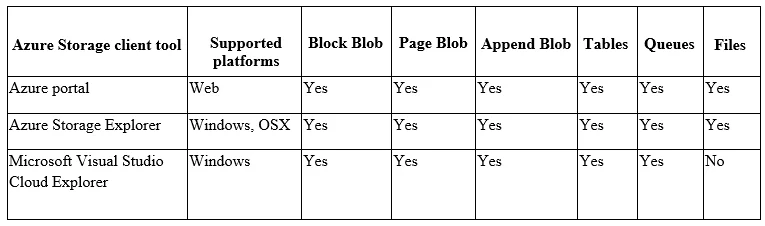
The correct answer is A. Azure Storage Explorer. Explanation Azure Storage Explorer is the correct tool because it is specifically designed to connect to and browse Azure Storage accounts, allowing you to navigate to the $logs container where diagnostic logs are automatically stored as blobs when diagnostics are enabled. It…
Question
Exhibit
Options
- AAzure Storage Explorer
- BSQL query editor in Azure
- CFile Explorer in Windows
- DAzure Security Center
How the community answered
(25 responses)- A92% (23)
- C4% (1)
- D4% (1)
Explanation
Explanation
Azure Storage Explorer is the correct tool because it is specifically designed to connect to and browse Azure Storage accounts, allowing you to navigate to the $logs container where diagnostic logs are automatically stored as blobs when diagnostics are enabled. It provides a graphical interface to download, view, and analyze these log files directly from blob storage.
Why the distractors are wrong:
- B (SQL query editor) is used for querying Azure SQL databases, not for accessing blob storage logs
- C (File Explorer in Windows) is a local file system tool with no native capability to connect to Azure Storage accounts
- D (Azure Security Center) is a security posture management and threat protection service - it doesn't retrieve diagnostic log files from storage accounts
Memory Tip
Think of it this way: "Storage logs → Storage Explorer" - whenever a question involves browsing or retrieving files from Azure Storage, Azure Storage Explorer is almost always the answer. Just as you use Windows File Explorer for local files, you use Azure Storage Explorer for cloud storage files.
Topics
Community Discussion
No community discussion yet for this question.