
AZ-500 · Question #135
Hotspot Question You create resources in an Azure subscription as shown in the following table. VNET1 contains two subnets named Subnet1 and Subnet2. Subnet1 has a network ID of 10.0.0.0/24. Subnet2…
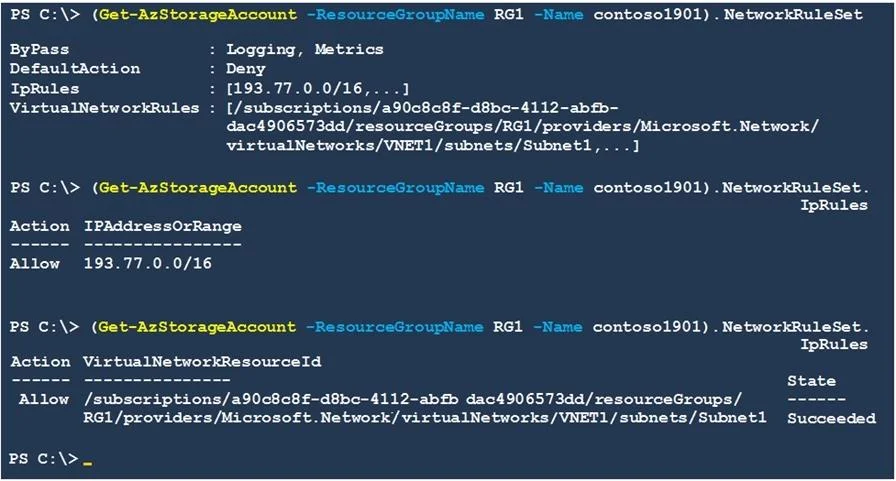
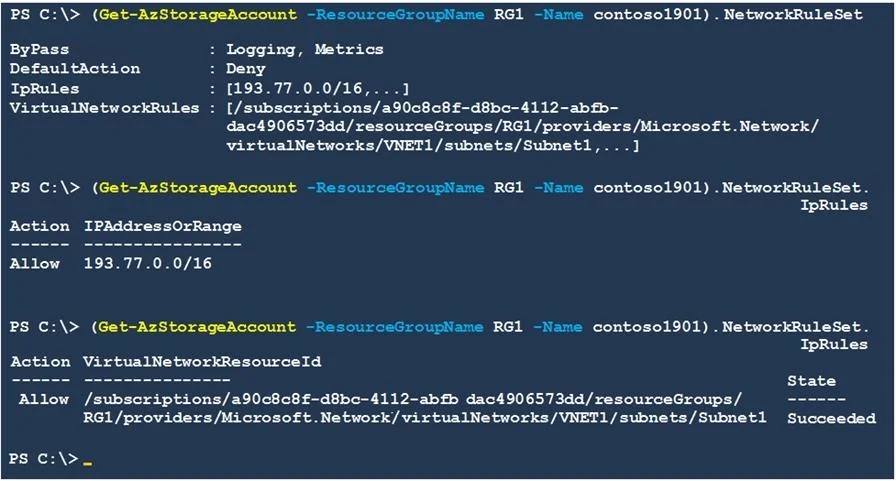
The correct answer is An Azure virtual machine on Subnet1 can access data in Contoso1901. = Yes; An Azure virtual machine on Subnet2 can access data in Contoso1901. = No; A computer on the Internet that has an IP address of 193.77.10.2 can access data in Contoso1901. = Yes. The storage account Contoso1901 is configured with a firewall that allows access from specific virtual network subnets and IP ranges. Subnet1 (10.0.0.0/24) is explicitly added to the allowed virtual networks, so VMs on Subnet1 can access the storage account. Subnet2…
Question
Exhibits
Answer Area
- An Azure virtual machine on Subnet1 can access data in Contoso1901.Yes
- An Azure virtual machine on Subnet2 can access data in Contoso1901.No
- A computer on the Internet that has an IP address of 193.77.10.2 can access data in Contoso1901.Yes
Explanation
The storage account Contoso1901 is configured with a firewall that allows access from specific virtual network subnets and IP ranges. Subnet1 (10.0.0.0/24) is explicitly added to the allowed virtual networks, so VMs on Subnet1 can access the storage account. Subnet2 (10.1.1.0/24) is NOT in the allowed list, so VMs on Subnet2 are blocked. The IP address 193.77.10.2 falls within an allowed IP range configured in the firewall rules (likely 193.77.10.0/24 or similar), granting internet-based access from that address.
Topics
Community Discussion
No community discussion yet for this question.