
AZ-400 · Question #567
SIMULATION In Project1, you need to create a variable group named varGroup1 that will contain the following variables: serverName: server1 dbName: db1 Answer:
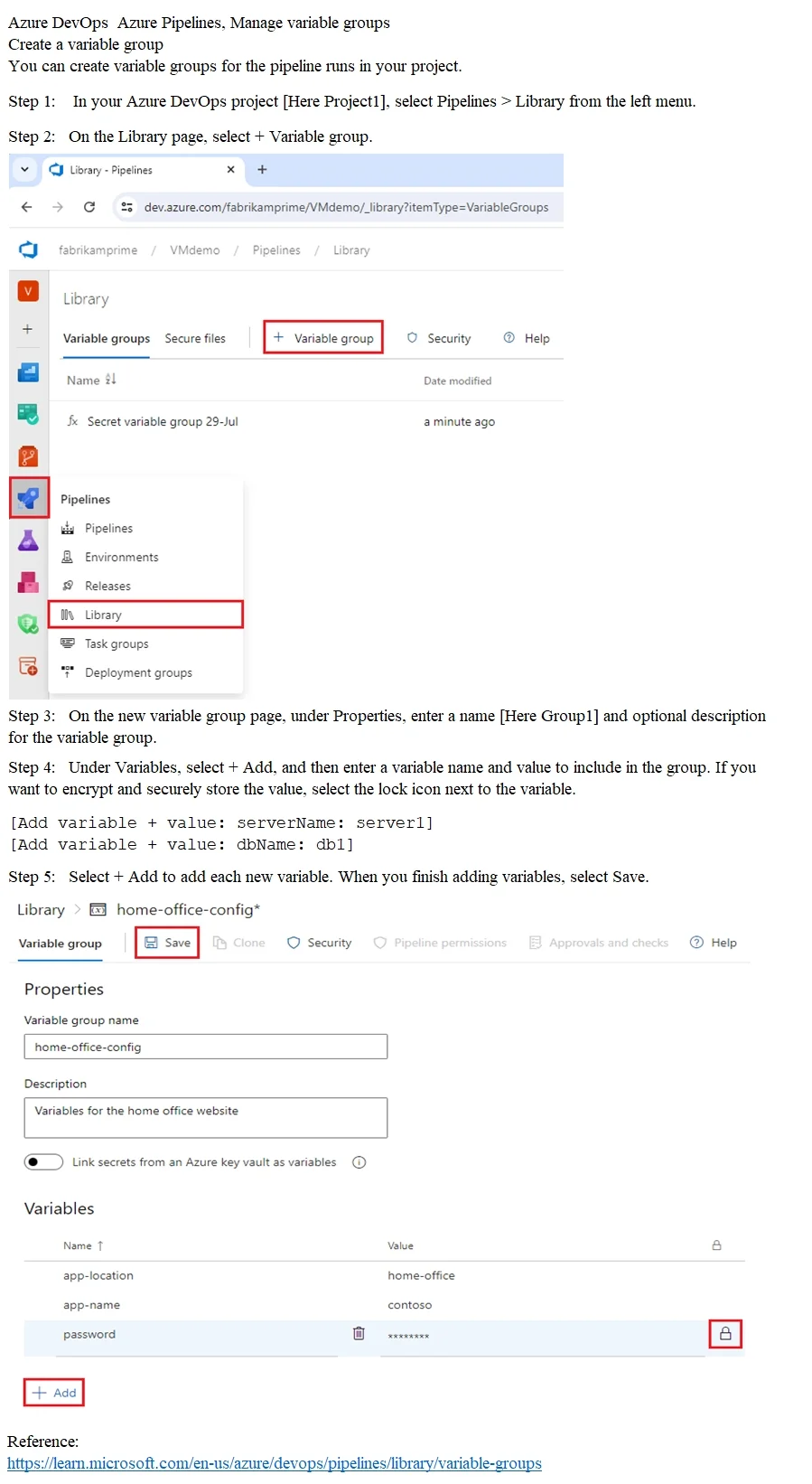
The correct steps follow the exact Azure DevOps workflow for creating a variable group: navigating to Pipelines > Library, clicking '+ Variable group', naming it 'varGroup1', and then adding each variable (serverName=server1, dbName=db1) using the '+ Add' button. This is the…
Question
Exhibit
Explanation
The correct steps follow the exact Azure DevOps workflow for creating a variable group: navigating to Pipelines > Library, clicking '+ Variable group', naming it 'varGroup1', and then adding each variable (serverName=server1, dbName=db1) using the '+ Add' button. This is the only supported UI path in Azure DevOps to create and populate a variable group at the project level, ensuring the variables are reusable across pipelines within Project1.
Topics
Community Discussion
No community discussion yet for this question.