
AZ-400 · Question #565
SIMULATION Initialize the default main branch, if it does not exist already. In the User1-12345678 organization, you need to install the Microsoft Security DevOps extension. Next, create a new…
This simulation tests the ability to install the Microsoft Security DevOps (MSDO) extension in an Azure DevOps organization and configure a YAML pipeline that runs the security scanning task with specific inputs, saving it to a feature branch.
Question
Exhibits
Explanation
This simulation tests the ability to install the Microsoft Security DevOps (MSDO) extension in an Azure DevOps organization and configure a YAML pipeline that runs the security scanning task with specific inputs, saving it to a feature branch.
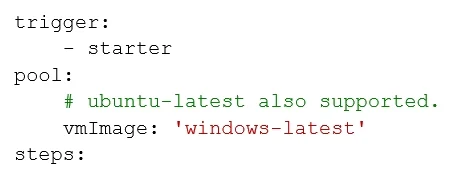
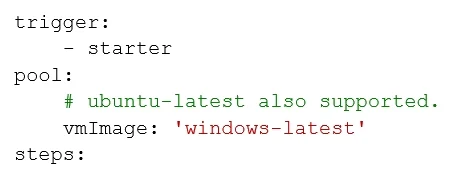
Approach. Step 1 - Initialize the main branch: Navigate to the repo and initialize it if no default branch exists (Repos > Files > Initialize). Step 2 - Install the extension: Go to Organization Settings > Extensions > Browse Marketplace, search for 'Microsoft Security DevOps', and install it into the User1-12345678 org. Step 3 - Create the pipeline: Go to Pipelines > New Pipeline, choose the repo, select 'Starter pipeline', and name it 'starter1'. In the YAML editor, add a task block using 'MicrosoftSecurityDevOps@1' with inputs: command: run, policy: azuredevops, publish: true. Step 4 - Save to branch: Instead of committing directly to main, choose 'Save and run' > 'Create a new branch' and name it 'starter', then save.
Concept tested. Microsoft Security DevOps (MSDO) Azure DevOps Extension - installation at the organization level and integration into a YAML pipeline via the MicrosoftSecurityDevOps@1 task. This is part of Microsoft Defender for DevOps and the Microsoft Cloud Security Benchmark, testing knowledge of DevSecOps toolchain setup in Azure DevOps pipelines.
Reference. https://learn.microsoft.com/en-us/azure/defender-for-cloud/azure-devops-extension
Topics
Community Discussion
No community discussion yet for this question.