
AZ-400 · Question #438
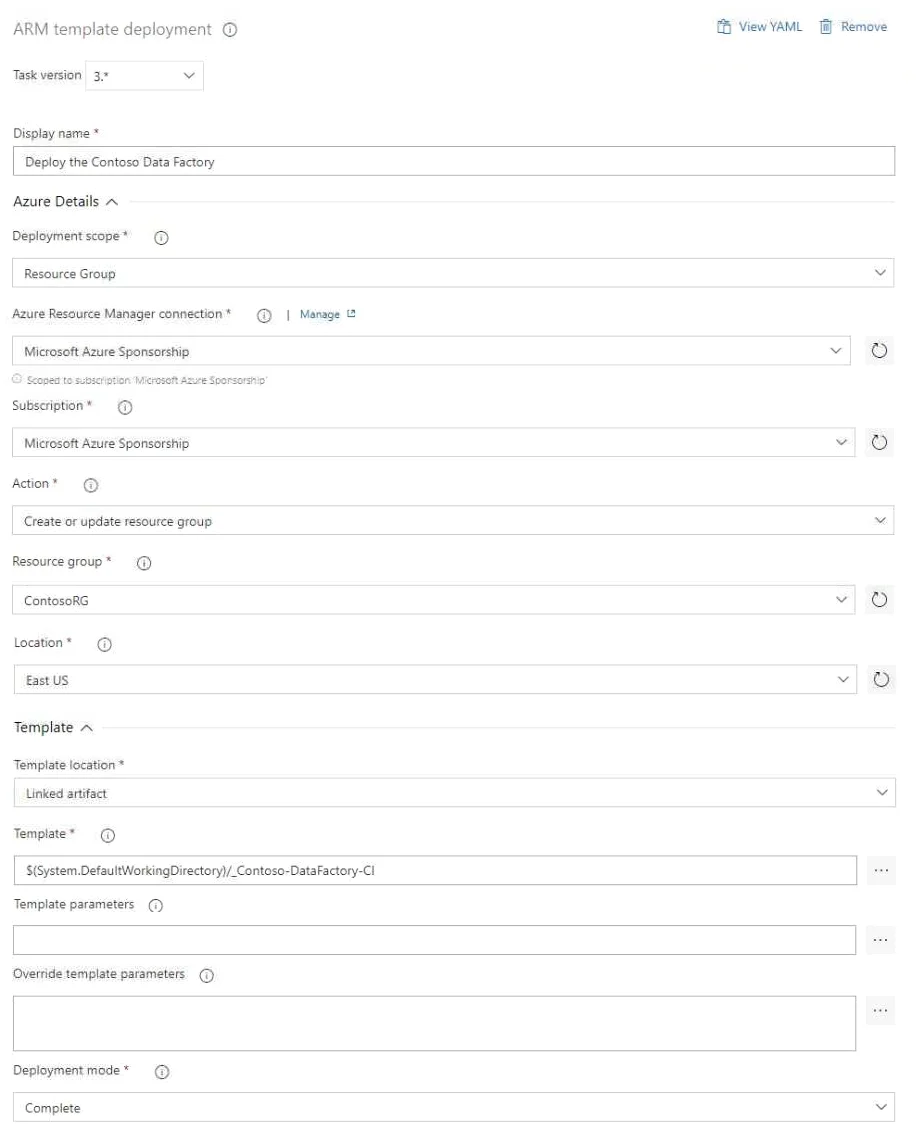
Hotspot Question You have an Azure subscription that contains two resource groups named ContosoRG and ContosoDev, an Azure data factory named Contoso Data Factory, and a release pipeline in Azure…
This hotspot question tests understanding of Azure Resource Manager (ARM) template deployment tasks in Azure Pipelines, specifically how deployment scope and resource group settings affect where resources are deployed.
Question
Exhibits
Answer Area
- The [answer choice] setting must be changed to prevent the modification of existing databases and web apps in ContosoRG.ActionTemplate locationDeployment modeDeployment scope
- Pipeline1 will retrieve the ARM template from the [answer choice].output of the continuous integration buildlocation specified in the Linked artifact variabledefault branch of the Git repository of Contoso Data Factory
Explanation
This hotspot question tests understanding of Azure Resource Manager (ARM) template deployment tasks in Azure Pipelines, specifically how deployment scope and resource group settings affect where resources are deployed.
Approach. In an ARM template deployment task configured with a Resource Group scope, the pipeline will deploy Contoso Data Factory to the resource group specified in the task configuration. Based on the exhibit, the task is configured to deploy to ContosoRG (not ContosoDev), meaning the deployment will succeed and target ContosoRG. If the ARM template deployment task is scoped to 'Resource Group' level and the resource group field specifies 'ContosoRG', then Pipeline1 will deploy the ARM template to ContosoRG. The key concept is that the 'Resource Group' field in the ARM template deployment task determines the target resource group, overriding any assumption that the pipeline's service connection or default settings would redirect the deployment. Additionally, if the action is set to 'Create or update resource group', the deployment will create resources in the specified resource group; if the resource group doesn't exist, it would be created, but since ContosoRG already exists, it will be updated with the Data Factory deployment.
Concept tested. Azure Pipelines ARM template deployment task configuration - specifically understanding how the deployment scope (Resource Group), the target resource group field, and the action type (Create or Update) determine where and how Azure resources are deployed via Pipeline1. The question validates that candidates understand the relationship between task parameters and actual deployment behavior in Azure DevOps.
Topics
Community Discussion
No community discussion yet for this question.