
AZ-400 · Question #437
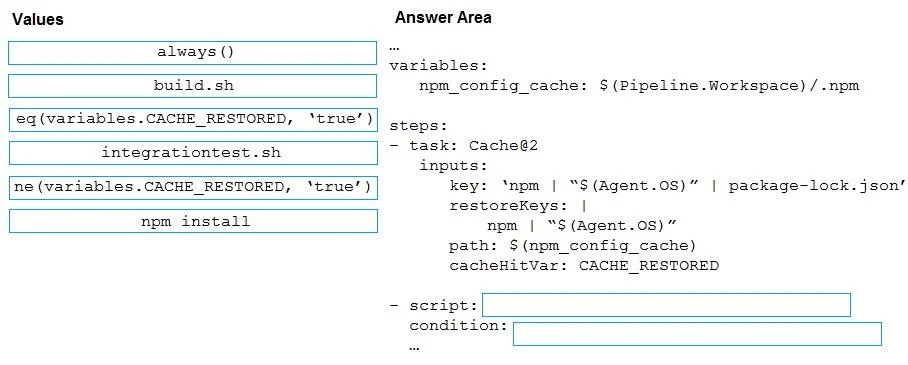
Drag and Drop Question You have an Azure DevOps pipeline that is used to deploy a Node.js app. You need to ensure that the dependencies are cached between builds. How should you configure the…
The correct answer is npm install; ne(variables.CACHE_RESTORED, 'true'). When caching dependencies in Azure DevOps pipelines, the cache task sets a variable (CACHE_RESTORED) to 'true' when a cache hit occurs. The install step should use 'npm install' as the command to install Node.js dependencies, and it should be conditionally run only when the…
Question
Exhibit
Answer Area
Drag items
Correct arrangement
- npm install
- ne(variables.CACHE_RESTORED, 'true')
Explanation
When caching dependencies in Azure DevOps pipelines, the cache task sets a variable (CACHE_RESTORED) to 'true' when a cache hit occurs. The install step should use 'npm install' as the command to install Node.js dependencies, and it should be conditionally run only when the cache was NOT restored - hence the condition 'ne(variables.CACHE_RESTORED, 'true')'. This prevents unnecessary reinstallation of packages when a valid cache already exists, saving build time.
Topics
Community Discussion
No community discussion yet for this question.