
AZ-400 · Question #200
SIMULATION You have a web app that connects to an Azure SQL Database named db1. You need to configure db1 to send Query Store runtime statistics to Azure Log Analytics. To complete this task, sign…
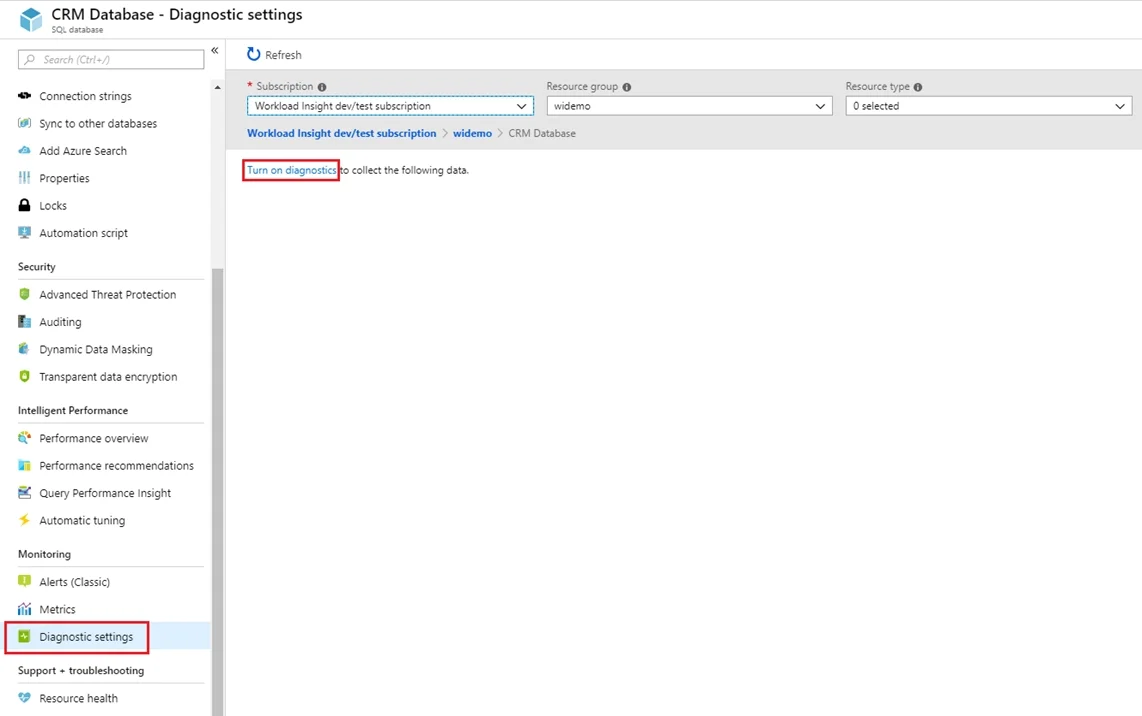
The correct approach uses Azure Diagnostics Settings on the SQL Database resource to stream Query Store runtime statistics to Log Analytics. By navigating to the database's Diagnostic Settings blade, adding a new diagnostic setting, selecting 'Send to Log Analytics' as the…
Question
Exhibit
Explanation
The correct approach uses Azure Diagnostics Settings on the SQL Database resource to stream Query Store runtime statistics to Log Analytics. By navigating to the database's Diagnostic Settings blade, adding a new diagnostic setting, selecting 'Send to Log Analytics' as the destination, and checking the 'QueryStoreRuntimeStatistics' log category, you establish the telemetry pipeline. This is the native Azure Monitor integration path for routing SQL Database diagnostic data - including Query Store metrics - to a Log Analytics workspace for querying and alerting.
Topics
Community Discussion
No community discussion yet for this question.