
AZ-400 · Question #199
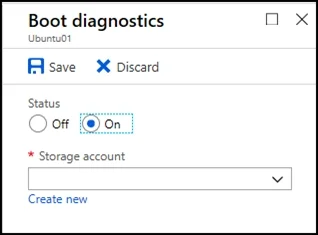
SIMULATION You need to create and configure an Azure Storage account named az400lod11566895stor in a resource group named RG1lod11566895 to store the boot diagnostics for a virtual machine named…
The correct approach requires two distinct steps: first creating a General Purpose v2 storage account named 'az400lod11566895stor' within the existing resource group 'RG1lod11566895', and then navigating to VM1's diagnostic settings to enable boot diagnostics and point them to…
Question
Exhibit
Explanation
The correct approach requires two distinct steps: first creating a General Purpose v2 storage account named 'az400lod11566895stor' within the existing resource group 'RG1lod11566895', and then navigating to VM1's diagnostic settings to enable boot diagnostics and point them to the newly created storage account. This ensures the storage account exists before being referenced by the VM's boot diagnostics configuration, which requires a compatible storage account type (GPv2 or Blob storage) in the same region as the VM.
Topics
Community Discussion
No community discussion yet for this question.