
AZ-400 · Question #139
SIMULATION You need to ensure that the https://contoso.com/statushook webhook is called every time a repository named az40010480345acr1 receives a new version of an image named dotnetapp. To…
Azure Container Registry Webhook Configuration Overall Goal Azure Container Registry (ACR) webhooks allow external systems to receive HTTP notifications when specific events occur in a registry - such as a new image being pushed. The goal here is to ensure…
Question
Exhibit
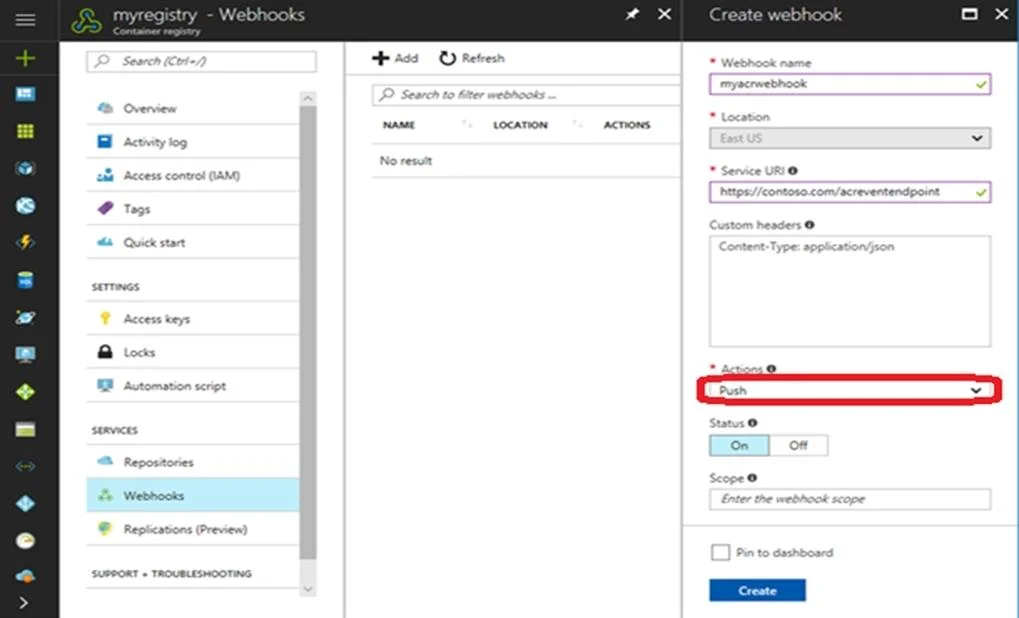
Explanation
Azure Container Registry Webhook Configuration
Overall Goal
Azure Container Registry (ACR) webhooks allow external systems to receive HTTP notifications when specific events occur in a registry - such as a new image being pushed. The goal here is to ensure https://contoso.com/statushook is triggered whenever a new version of the dotnetapp image is pushed to the az40010480345acr1 registry. This enables downstream automation (deployments, notifications, CI/CD pipelines) to react to new image versions automatically.
Step-by-Step Reasoning
Step 1 - Sign in to the Azure portal Authentication is required before you can access or modify any Azure resource. Without signing in, no resources are visible.
Step 2 - Navigate to the container registry az40010480345acr1
You must be in the correct registry's context. ACR webhooks are scoped to a specific registry, so navigating to the right one ensures you're configuring the webhook for the correct source of image events - not some other registry.
Step 3 - Under Services, select Webhooks Webhooks in ACR live under the Services section of the registry blade. This is where all outbound HTTP callbacks are managed. Skipping this and looking elsewhere (e.g., Access Keys, Networking) would mean you never find the webhook configuration UI.
Step 4 - Select the existing webhook and open its properties
The webhook https://contoso.com/statushook already exists - the task is to configure it, not create a new one. Opening its properties is required to modify its trigger actions and scope. If you created a new webhook instead of editing the existing one, you'd have a duplicate and the old one (unconfigured) would remain.
Step 5 - Set Trigger actions to "image push" This is the critical configuration step. ACR webhooks support multiple trigger events:
push- a new image or tag is pusheddelete- an image or tag is deletedquarantine- (if quarantine policy is enabled)chart_push/chart_delete- for Helm charts
Selecting image push ensures the webhook fires specifically when a new version of an image arrives. Without this, the webhook either won't fire at all (if no trigger is set) or may fire on unintended events like deletions.
Note on scope: In a full configuration, you'd also set the Repository scope to
dotnetappso the webhook only fires for that specific image - not every image pushed to the registry. The simulation answer focuses on the trigger action, but the scope field (set todotnetapp) is equally important in practice.
What Goes Wrong If Steps Are Skipped
| Skipped Step | Consequence |
|---|---|
| Step 2 (wrong registry) | Webhook configured on wrong ACR; dotnetapp pushes never trigger it |
| Step 3 (wrong blade) | Can't find webhook settings at all |
| Step 4 (create instead of edit) | Duplicate webhooks; original remains misconfigured |
| Step 5 (wrong trigger) | Webhook fires on wrong events, or never fires |
Memory Tip
Think of it as "Who -> Where -> What triggers it":
- Who = the registry (
az40010480345acr1) - Where = Services -> Webhooks -> the specific webhook URL
- What triggers it =
image push(on thedotnetappscope)
ACR webhooks follow the same mental model as GitHub webhooks - you pick the resource, find its webhook settings, and select the events that should fire it.
Topics
Community Discussion
No community discussion yet for this question.