
AZ-305 · Question #70
Case Study 1 - Litware Existing Environment Azure Environment Litware has 10 Azure subscriptions that are linked to the Litware.com tenant and five Azure subscriptions that are linked to the…
The correct answer is Number of host groups:: 3; Number of virtual machine scale sets:: 3. This hotspot question tests knowledge of Azure RBAC custom roles, Conditional Access policies, and hybrid Azure AD join requirements for securing production environment access through the Azure portal.
Question
Exhibit
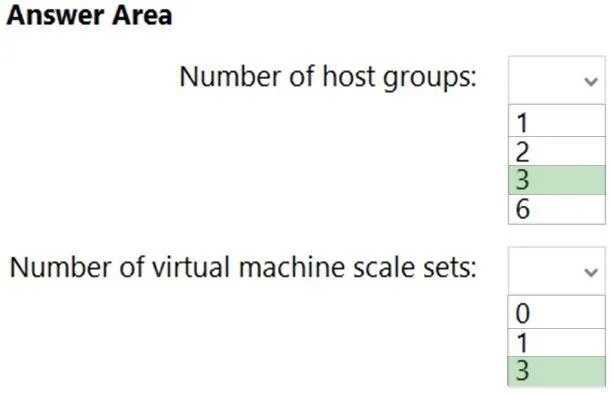
Answer Area
- Number of host groups:31236
- Number of virtual machine scale sets:3013
Explanation
This hotspot question tests knowledge of Azure RBAC custom roles, Conditional Access policies, and hybrid Azure AD join requirements for securing production environment access through the Azure portal.
Approach. The correct approach involves understanding that Role1 is a custom RBAC role scoped to DataActions for blobs and files, meaning it can only be assigned within the litware.com tenant and cannot be directly transferred to the dev.litware.com tenant without recreation. For the authentication requirement that production environment users must connect from hybrid Azure AD-joined devices, a Conditional Access policy must be created that targets the production management users and enforces the 'Require Hybrid Azure AD joined device' grant control, scoped specifically to Azure portal access. This ensures only compliant, domain-joined devices can authenticate to manage production resources, satisfying the zero-trust security posture Litware requires.
Concept tested. Azure RBAC custom role scope and tenant boundaries, Conditional Access policy configuration for hybrid Azure AD-joined device compliance, and the relationship between Enterprise Agreement subscriptions and Azure AD tenants in a multi-tenant environment.
Reference. Microsoft Docs: Custom roles in Azure RBAC (https://learn.microsoft.com/en-us/azure/role-based-access-control/custom-roles) and Conditional Access: Require compliant or hybrid Azure AD joined device (https://learn.microsoft.com/en-us/azure/active-directory/conditional-access/howto-conditional-access-policy-compliant-device)
Topics
Community Discussion
No community discussion yet for this question.