
AZ-305 · Question #49
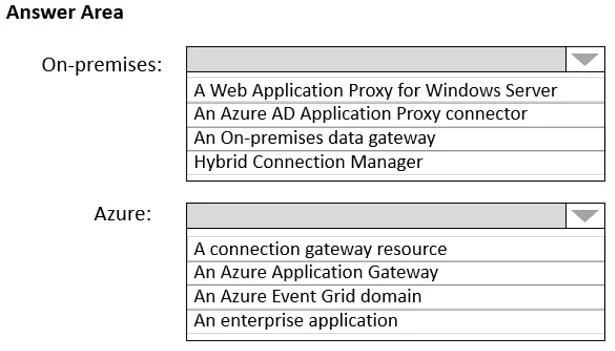
Hotspot Question You have an Azure subscription named Subscription1 that is linked to a hybrid Azure Active Directory (Azure AD) tenant. You have an on-premises datacenter that does NOT have a VPN…
This question tests knowledge of how Azure Logic Apps can securely communicate with on-premises resources (like SQL Server) that have no internet access and no VPN connection to Azure.
Question
Exhibit
Answer Area
- On-premises:A Web Application Proxy for Windows ServerAn Azure AD Application Proxy connectorAn On-premises data gatewayHybrid Connection Manager
- Azure:A connection gateway resourceAn Azure Application GatewayAn Azure Event Grid domainAn enterprise application
Explanation
This question tests knowledge of how Azure Logic Apps can securely communicate with on-premises resources (like SQL Server) that have no internet access and no VPN connection to Azure.
Approach. On-premises, you should deploy the On-premises Data Gateway on a machine in the datacenter (or on Server1 itself) - this agent establishes an outbound connection to Azure Relay (Service Bus), so no inbound firewall rules or VPN are needed. In Azure, you should deploy an On-premises Data Gateway resource (Azure resource) in Subscription1, which acts as the cloud-side registration/configuration point that LogicApp1 references when connecting to the SQL Server 2016 database on Server1. The on-premises gateway agent communicates outbound over port 443 via Azure Service Bus Relay, bypassing the need for a VPN or internet access from Server1 directly.
Concept tested. Azure On-premises Data Gateway architecture - understanding that Logic Apps (and other Azure services like Power BI, Power Automate) use the On-premises Data Gateway to securely bridge Azure services to on-premises data sources without requiring a VPN or direct internet exposure of the on-premises server.
Reference. https://docs.microsoft.com/en-us/azure/logic-apps/logic-apps-gateway-install
Topics
Community Discussion
No community discussion yet for this question.