
AZ-305 · Question #451
Hotspot Question You have an on-premises app named App1 that uses the Hyper-V virtual machines shown in the following table. You plan to migrate App1 to Azure. You need to recommend which services…
The correct answer is Service for SQL1 migration: Azure SQL managed instance; Service for VM1 migration: Azure Virtual Machine; Service for share1 migration: Azure Files share. This question tests knowledge of Azure Migrate tools and services used to migrate different workload types (file shares, SQL databases, and VMs) with minimal downtime and zero data loss.
Question
Exhibits


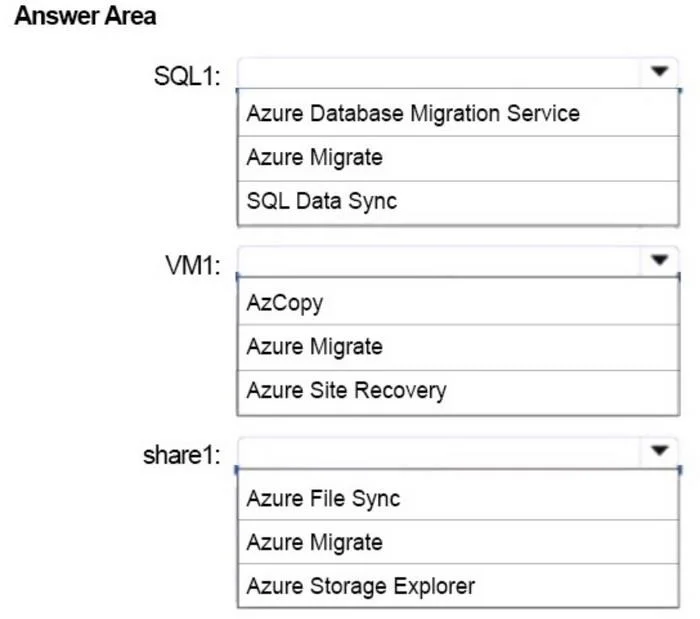
Answer Area
- Service for SQL1 migrationAzure SQL managed instanceAzure SQL DatabaseAzure SQL managed instanceSQL Server on Azure VM
- Service for VM1 migrationAzure Virtual MachineAzure App ServiceAzure Kubernetes ServiceAzure Virtual Machine
- Service for share1 migrationAzure Files shareAzure Blob StorageAzure Files shareAzure NetApp Files
Explanation
This question tests knowledge of Azure Migrate tools and services used to migrate different workload types (file shares, SQL databases, and VMs) with minimal downtime and zero data loss.
Approach. For share1 (a file share on a Hyper-V VM), you should use Azure Migrate: Server Migration to migrate the VM hosting the share, then use Azure File Sync or Azure Storage Mover to migrate the file share content to a premium Azure Files share. For SQL1, you should use Azure Database Migration Service (DMS) in online mode to migrate to Azure SQL Managed Instance - DMS supports online migration with minimal downtime and zero data loss via log shipping/CDC. For VM1, you should use Azure Migrate: Server Assessment to complete a sizing assessment before migration, and then use Azure Migrate: Server Migration (which leverages Azure Site Recovery replication) to lift-and-shift the VM to Azure with minimal downtime. The key distinction is that SQL1 requires DMS for database-aware migration, VM1 requires Azure Migrate (Server Assessment + Server Migration), and share1 requires a file-share-specific migration approach targeting premium Azure Files.
Concept tested. Understanding which Azure Migrate tools and services are appropriate for specific workload types: Azure Migrate: Server Assessment for pre-migration sizing, Azure Migrate: Server Migration for Hyper-V VMs, and Azure Database Migration Service (DMS) for SQL workloads migrating to Azure SQL Managed Instance with minimal downtime and zero data loss.
Reference. https://learn.microsoft.com/en-us/azure/migrate/migrate-services-overview
Topics
Community Discussion
No community discussion yet for this question.