
AZ-305 · Question #41
Hotspot Question You plan to create an Azure Storage account that will host file shares. The shares will be accessed from on-premises applications that are transaction-intensive. You need to…
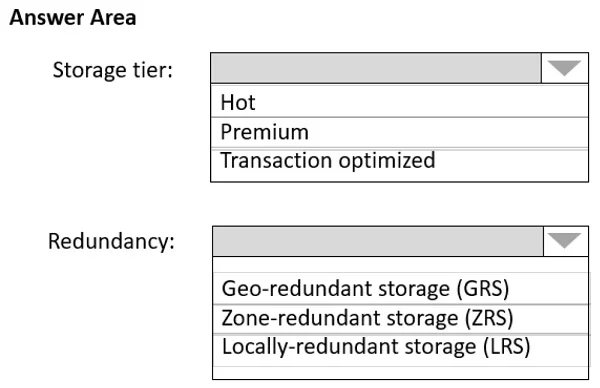
The correct answer is Storage tier:: Premium; Redundancy:: Zone-redundant storage (ZRS). This hotspot question tests knowledge of Azure Files storage tiers and redundancy options, specifically which combination minimizes latency for transaction-intensive workloads while providing the highest resiliency available for that tier.
Question
Exhibit
Answer Area
- Storage tier:PremiumHotPremiumTransaction optimized
- Redundancy:Zone-redundant storage (ZRS)Geo-redundant storage (GRS)Zone-redundant storage (ZRS)Locally-redundant storage (LRS)
Explanation
This hotspot question tests knowledge of Azure Files storage tiers and redundancy options, specifically which combination minimizes latency for transaction-intensive workloads while providing the highest resiliency available for that tier.
Approach. For transaction-intensive, latency-sensitive file share workloads accessed from on-premises, the correct storage tier is 'Premium' (FileStorage account kind) because it uses SSD-backed storage, delivering single-digit millisecond latency. The highest resiliency available for Premium file shares is 'Zone-Redundant Storage (ZRS)', which replicates data synchronously across three availability zones within a region. Note that Premium file shares do NOT support GRS or GZRS - LRS and ZRS are the only options, making ZRS the highest resiliency tier available. Therefore, the correct selections are: Storage tier = Premium, and Redundancy = Zone-redundant storage (ZRS).
Concept tested. Azure Files storage tiers (Standard vs Premium) and their supported redundancy options. Premium file shares use SSDs for low latency and only support LRS and ZRS redundancy, making ZRS the maximum resiliency option. Standard file shares support LRS, ZRS, GRS, and GZRS but use HDDs with higher latency, making them unsuitable for transaction-intensive workloads.
Reference. https://learn.microsoft.com/en-us/azure/storage/files/storage-files-planning#storage-tiers
Topics
Community Discussion
No community discussion yet for this question.