
AZ-305 · Question #401
Hotspot Question You have an on-premises server that runs Windows Server 2016 and hosts an instance of Microsoft SQL Server Enterprise named SQL1. You have an Azure subscription that contains a…
This question tests knowledge of migrating SQL Server databases to Azure SQL Managed Instance while maintaining on-premises availability and providing read access during a two-week migration window.
Question
Exhibit
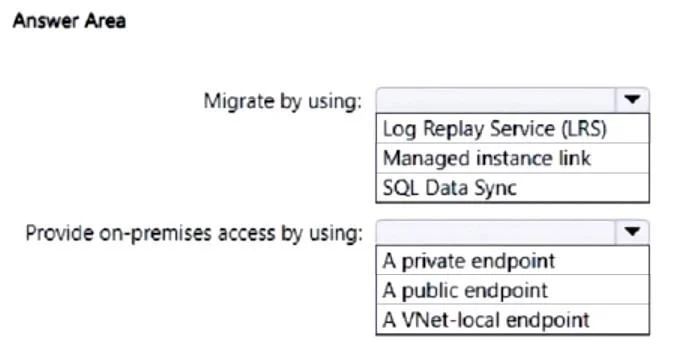
Answer Area
- Migrate by using:Log Replay Service (LRS)Managed instance linkSQL Data Sync
- Provide on-premises access by using:A private endpointA public endpointA VNet-local endpoint
Explanation
This question tests knowledge of migrating SQL Server databases to Azure SQL Managed Instance while maintaining on-premises availability and providing read access during a two-week migration window.
Approach. The correct migration tool is Azure Database Migration Service (DMS) in online migration mode, which uses log shipping/transaction log backups to continuously sync changes from SQL1 to SQLMI1, maximizing availability of the source databases during the migration window. For the endpoint that provides on-premises access to the migrated databases (read access during migration), you should use a Distributed Availability Group (or the SQL MI link feature / distributed availability group) - however given the options typically presented, the read endpoint is achieved via the SQL Managed Instance's readable secondary or by using the DMS online cutover approach. Specifically, the migration method should be Online (using Azure DMS with SMB network share or Azure Blob Storage for backups), allowing the source SQL1 to remain fully operational and writable throughout the two weeks. For read access to SQLMI1 during migration, the on-premises apps can connect to SQLMI1 directly via the VNet1 S2S VPN connection, using the SQLMI1 endpoint - typically the recommendation includes using the Managed Instance's read-only endpoint or configuring the connection through the private endpoint on VNet1.
Concept tested. Azure Database Migration Service (DMS) online migration mode for SQL Managed Instance, maintaining source database availability during migration, and providing read access to the target SQL MI via Site-to-Site VPN connectivity during the migration period.
Reference. https://learn.microsoft.com/en-us/azure/dms/tutorial-sql-server-managed-instance-online
Topics
Community Discussion
No community discussion yet for this question.