
AZ-305 · Question #394
Hotspot Question You have an Azure subscription. You plan to deploy an app that requires an Azure Data Lake Storage Gen2 account. You need to recommend which settings to modify during the storage…
The correct answer is Infrastructure encryption: Enabled; Allow access from: Selected networks. To ensure that data in the Azure Data Lake Storage Gen2 account is protected, especially if an attacker gains access to the physical disk, two settings should be modified: 1. Infrastructure encryption => Enabled: As stated in the explanation, enabling infrastructure encryption…
Question
Exhibit
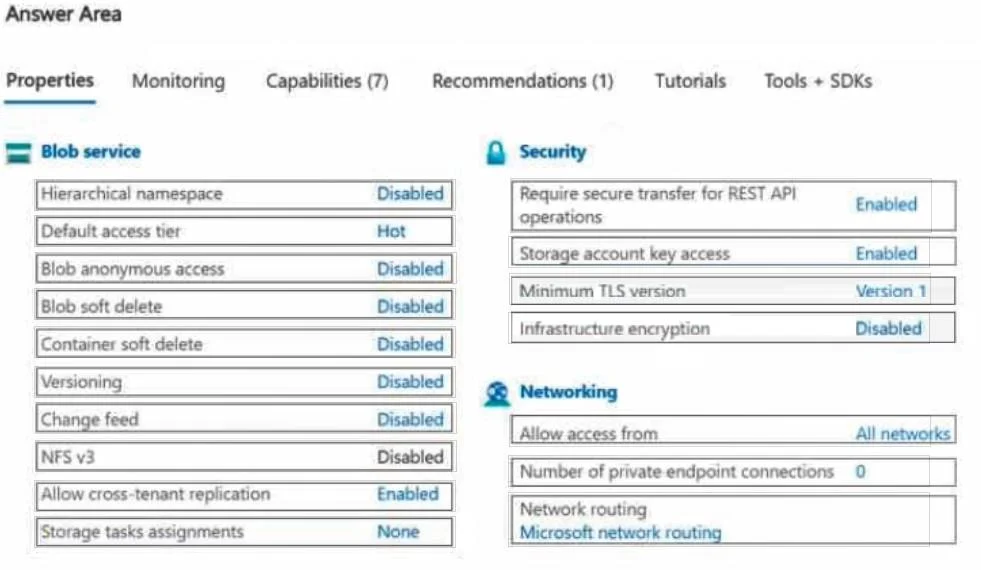
Answer Area
- Infrastructure encryptionEnabledDisabledEnabled
- Allow access fromSelected networksAll networksSelected networks
Explanation
To ensure that data in the Azure Data Lake Storage Gen2 account is protected, especially if an attacker gains access to the physical disk, two settings should be modified:
-
Infrastructure encryption => Enabled: As stated in the explanation, enabling infrastructure encryption provides a second layer of encryption for the data, in addition to the service-level encryption. Data is encrypted twice-once at the service level and once at the infrastructure level-using two different encryption algorithms and keys. This double encryption specifically protects against scenarios where an attacker gains access to the physical disk or where one encryption algorithm/key might be compromised, thereby ensuring continuous data protection.
-
Allow access from => Selected networks: The explanation indicates that in Firewalls and virtual networks, setting "Allow access from" to "Allow public access from specific virtual networks and IP addresses" restricts network access. Changing this from the default "All networks" to "Selected networks" significantly enhances security by limiting who can connect to the storage account, preventing unauthorized network access to the data.
Community Discussion
No community discussion yet for this question.