
AZ-305 · Question #388
Hotspot Question Your on-premises network contains an Active Directory Domain Services (AD DS) forest. The forest contains servers that run Windows Server. The servers contain file shares that…
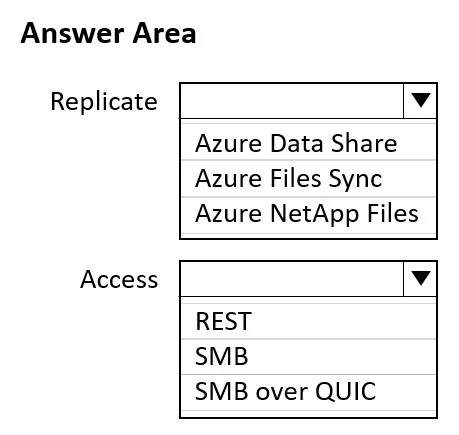
Dropdown 1: Replicate - Correct Answer: Azure File Sync Why Azure File Sync is correct Azure File Sync is purpose-built for exactly this scenario: synchronizing Windows Server file shares (on-premises or Azure VMs) with Azure Files as a cloud endpoint, and keeping multiple…
Question
Exhibit
Answer Area
- ReplicateAzure Data ShareAzure Files SyncAzure NetApp Files
- AccessRESTSMBSMB over QUIC
Explanation
Dropdown 1: Replicate - Correct Answer: Azure File Sync
Why Azure File Sync is correct
Azure File Sync is purpose-built for exactly this scenario: synchronizing Windows Server file shares (on-premises or Azure VMs) with Azure Files as a cloud endpoint, and keeping multiple server endpoints in sync. It supports multi-endpoint replication, meaning you can replicate from on-premises Windows Servers to Windows Server VMs in Azure. It integrates natively with AD DS, supports NTFS permissions, and works alongside DFS namespaces - making it a natural successor to DFS Replication for hybrid migrations.
Why the alternatives are wrong
- Azure Data Share - A data-sharing service designed for sharing datasets with external organizations (B2B). It has no concept of file share replication between your own on-premises and cloud environments. Wrong tool entirely.
- Azure NetApp Files - A high-performance managed NAS service (NFS/SMB) for lift-and-shift enterprise workloads. It hosts file shares but provides no replication mechanism from on-premises servers. It doesn't solve the "replicate to Azure VMs" requirement.
Dropdown 2: Access - Correct Answer: SMB
Why SMB is correct
The question specifies two hard requirements for client access:
- Mapped drive letters - requires SMB (UNC paths like
\\server\sharemapped to drive letters) - TCP port 445 - this is the standard SMB port
Standard SMB over TCP 445 satisfies both constraints. The Windows 11 devices connect via P2S VPN, which tunnels them into the Azure virtual network, giving them direct TCP 445 access to the Azure VM file servers - exactly like being on the corporate LAN.
Why the alternatives are wrong
- REST - Azure Files supports a REST API (HTTPS port 443), but REST cannot be used to map a drive letter. It's for programmatic access, not Windows Explorer or
net usemappings. - SMB over QUIC - SMB over QUIC is a modern transport that wraps SMB in the QUIC protocol over UDP port 443 (not TCP 445). The question explicitly requires TCP port 445, so this is disqualified. SMB over QUIC is also designed for internet-facing access without VPN - the devices here already have VPN connectivity, so it's unnecessary.
Summary
| Dropdown | Correct Choice | Key Reason |
|---|---|---|
| Replicate | Azure File Sync | Syncs Windows Server file shares to Azure; multi-endpoint, AD-aware |
| Access | SMB | Drive mappings require SMB; TCP 445 is standard SMB - not QUIC (UDP 443) |
Topics
Community Discussion
No community discussion yet for this question.