
AZ-305 · Question #345
You have an app named App1 that uses an Azure Blob Storage container named app1data. App1 uploads a cumulative transaction log file named File1.txt to a block blob in app1data once every hour…
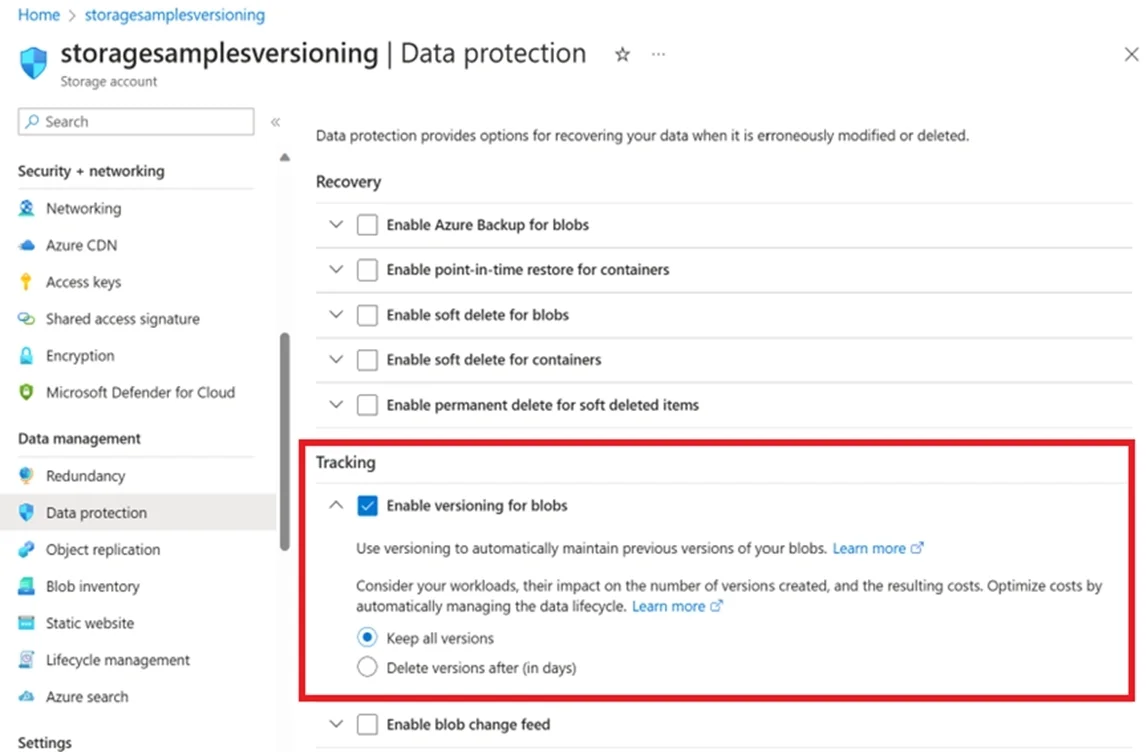
The correct answer is D. blob versioning. You can enable Blob storage versioning to automatically maintain previous versions of a blob when it is modified or deleted. When blob versioning is enabled, then you can restore an earlier version of a blob to recover your data if it is erroneously modified or deleted. Note…
Question
Exhibit
Options
- Acontainer soft delete
- Bblob snapshots
- Cblob soft delete
- Dblob versioning
How the community answered
(29 responses)- B3% (1)
- C3% (1)
- D93% (27)
Explanation
You can enable Blob storage versioning to automatically maintain previous versions of a blob when it is modified or deleted. When blob versioning is enabled, then you can restore an earlier version of a blob to recover your data if it is erroneously modified or deleted. Note: To enable blob versioning for a storage account in the Azure portal: 1. Navigate to your storage account in the portal. 2. Under Data management, choose Data protection. 3. In the Tracking section, select Enable versioning for blobs, and then choose whether to keep all versions or delete them after a period of time. https://learn.microsoft.com/en-us/azure/storage/blobs/versioning-enable
Community Discussion
No community discussion yet for this question.