
AZ-305 · Question #289
Hotspot Question You are planning an Azure Storage solution for sensitive data. The data will be accessed daily. The data set is less than 10 GB. You need to recommend a storage solution that meets…
The solution requires a General Purpose v2 storage account with the Hot access tier for daily data access and a Container access policy (referring to an immutability policy) to enforce Write Once, Read Many (WORM) requirements for five years.
Question
Exhibit
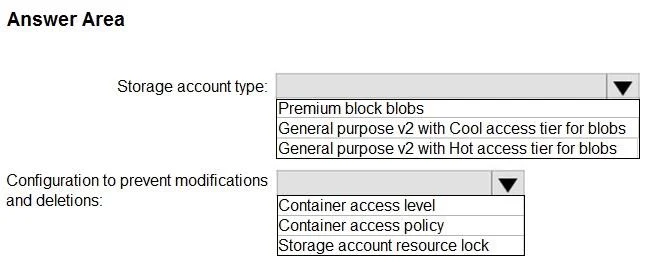
Answer Area
- Storage account type:Premium block blobsGeneral purpose v2 with Cool access tier for blobsGeneral purpose v2 with Hot access tier for blobs
- Configuration to prevent modifications and deletions:Container access levelContainer access policyStorage account resource lock
Explanation
The solution requires a General Purpose v2 storage account with the Hot access tier for daily data access and a Container access policy (referring to an immutability policy) to enforce Write Once, Read Many (WORM) requirements for five years.
Approach. 1. Storage account type: The scenario specifies 'data will be accessed daily' and 'data access charges must be minimized'. For frequently accessed data, the 'Hot access tier' provides the lowest access costs, albeit with slightly higher storage costs than 'Cool'. Given the daily access requirement, 'Hot' is the most cost-effective choice overall compared to 'Cool' which incurs higher transaction costs for frequent access. 'Premium block blobs' are for very high performance and lower latency scenarios, which is not indicated as a primary requirement and would be more expensive. Therefore, 'General purpose v2 with Hot access tier for blobs' is the correct selection. 2. Configuration to prevent modifications and deletions: The requirements state, 'Once the data is written, the data can only be read. Modifications and deletion must be prevented,' and 'After five years, the data can be deleted, but never modified.' This is a classic Write Once, Read Many (WORM) requirement, which in Azure Blob Storage is implemented using 'Immutability Policies' (also known as WORM policies) at the container level. While 'Immutability Policy' isn't explicitly an option, 'Container access policy' is the best fit among the choices. 'Container access level' controls public anonymous access and doesn't prevent authenticated modifications. 'Storage account resource lock' protects the Azure resource (the storage account or container itself) from control-plane operations (like deletion of the resource) but does not prevent data-plane operations (like modifying/deleting blobs within a container). Therefore, by process of elimination and understanding the functionality, 'Container access policy' is the most appropriate option to represent the application of an immutability policy at the container level.
Common mistakes.
- common_mistake. 1. Choosing 'Cool access tier' for daily access: A common mistake is selecting 'Cool access tier' because it has lower storage costs. However, 'Cool' is designed for infrequently accessed data (minimum 30-day retention) and incurs higher transaction (access) costs. For daily access, these higher access costs would quickly outweigh the storage savings, leading to higher overall costs, contradicting the 'minimize data access charges' requirement.
- Choosing 'Storage account resource lock' for data immutability: Resource locks operate at the Azure Resource Manager (control plane) level, preventing modification or deletion of the storage account or container itself. They do NOT prevent data-plane operations such as modifying or deleting blobs within the container by users with appropriate data permissions. The requirement is to prevent data modification/deletion, not resource modification/deletion.
- Choosing 'Container access level' for WORM: 'Container access level' controls public anonymous access to blobs within a container (e.g., private, blob, container). It has no bearing on preventing modifications or deletions by authenticated users or enforcing WORM policies.
Concept tested. This question tests knowledge of Azure Storage account types, blob access tiers (Hot vs. Cool) and their cost implications, and data protection mechanisms including immutability policies (WORM) at the container level, distinguishing them from public access controls and resource locks.
Reference. https://learn.microsoft.com/en-us/azure/storage/blobs/access-tiers-overview https://learn.microsoft.com/en-us/azure/storage/blobs/immutable-storage-overview
Topics
Community Discussion
No community discussion yet for this question.