
AZ-305 · Question #212
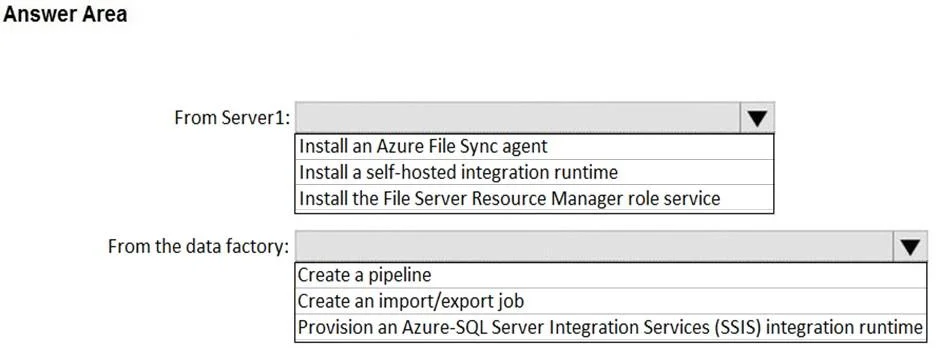
Hotspot Question Your on-premises network contains a file server named Server1 that stores 500 GB of data. You need to use Azure Data Factory to copy the data from Server1 to Azure Storage. You add…
The correct answer is From Server1:: Install a self-hosted integration runtime; From the data factory:: Create a pipeline. This hotspot question tests knowledge of the correct sequence of steps to configure Azure Data Factory to copy data from an on-premises file server to Azure Storage, specifically focusing on the Integration Runtime and linked service setup.
Question
Exhibit
Answer Area
- From Server1:Install a self-hosted integration runtimeInstall an Azure File Sync agentInstall a self-hosted integration runtimeInstall the File Server Resource Manager role service
- From the data factory:Create a pipelineCreate a pipelineCreate an import/export jobProvision an Azure-SQL Server Integration Services (SSIS) integration runtime
Explanation
This hotspot question tests knowledge of the correct sequence of steps to configure Azure Data Factory to copy data from an on-premises file server to Azure Storage, specifically focusing on the Integration Runtime and linked service setup.
Approach. After creating the Data Factory, the correct next steps are: (1) Install a Self-hosted Integration Runtime on the on-premises network - since Server1 is on-premises, a Self-hosted IR (not Azure IR) is required to bridge connectivity between the on-premises environment and Azure. (2) Create a Linked Service for the on-premises file server using the Self-hosted Integration Runtime, which defines the connection to Server1. (3) Create a Linked Service for the Azure Storage account as the destination. (4) Create Datasets pointing to the source (Server1) and sink (Azure Storage). (5) Create a Pipeline with a Copy Activity that references those datasets. The Self-hosted Integration Runtime must be downloaded, installed, and registered on a machine that can reach Server1 before any on-premises connectivity is possible.
Concept tested. Azure Data Factory pipeline configuration for hybrid (on-premises to cloud) data movement, specifically the role and setup of the Self-hosted Integration Runtime as the prerequisite step after creating the data factory, followed by linked services, datasets, and copy pipelines.
Reference. https://learn.microsoft.com/en-us/azure/data-factory/create-self-hosted-integration-runtime
Topics
Community Discussion
No community discussion yet for this question.