
AZ-305 · Question #209
Hotspot Question Your company deploys several Linux and Windows virtual machines (VMs) to Azure. The VMs are deployed with the Microsoft Dependency Agent and the Log Analytics Agent installed by…
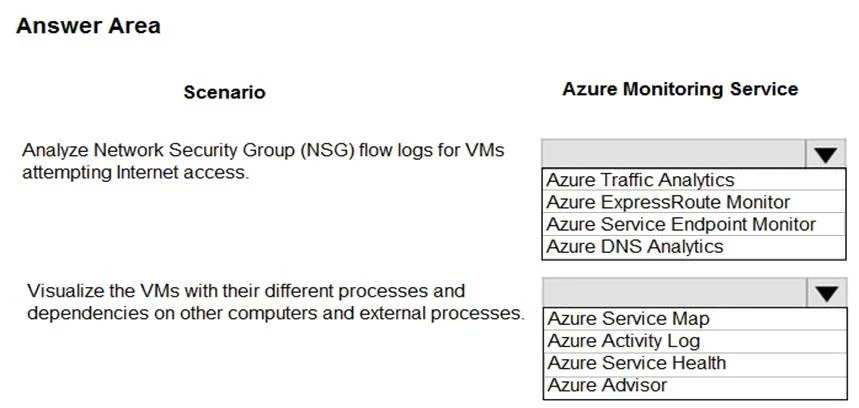
The correct answer is Analyze Network Security Group (NSG) flow logs for VMs attempting Internet access.: Azure Traffic Analytics; Visualize the VMs with their different processes and dependencies on other computers and external processes.: Azure Service Map. This hotspot question tests knowledge of which Azure monitoring services are appropriate for monitoring Linux and Windows VMs that have the Microsoft Dependency Agent and Log Analytics Agent installed, connected via ExpressRoute.
Question
Exhibit
Answer Area
- Analyze Network Security Group (NSG) flow logs for VMs attempting Internet access.Azure Traffic AnalyticsAzure Traffic AnalyticsAzure ExpressRoute MonitorAzure Service Endpoint MonitorAzure DNS Analytics
- Visualize the VMs with their different processes and dependencies on other computers and external processes.Azure Service MapAzure Service MapAzure Activity LogAzure Service HealthAzure Advisor
Explanation
This hotspot question tests knowledge of which Azure monitoring services are appropriate for monitoring Linux and Windows VMs that have the Microsoft Dependency Agent and Log Analytics Agent installed, connected via ExpressRoute.
Approach. Azure Monitor VM Insights (formerly Azure Monitor for VMs) is the correct service to use because it leverages both the Log Analytics Agent and the Microsoft Dependency Agent to provide performance monitoring, dependency mapping (Service Map), and health monitoring for both Linux and Windows VMs - including on-premises machines connected via ExpressRoute. The Log Analytics Agent collects performance counters, events, and logs and sends them to a Log Analytics Workspace, which is the backbone for querying and alerting in Azure Monitor. The Microsoft Dependency Agent enables the Map feature in VM Insights, which visualizes process dependencies and network connections between machines. Together, these two agents with VM Insights provide comprehensive VM monitoring coverage for both Azure-hosted and on-premises VMs connected via ExpressRoute, making Azure Monitor VM Insights the primary recommended solution rather than standalone tools like Azure Security Center (now Defender for Cloud) or Network Watcher, which serve different purposes.
Concept tested. Understanding which Azure monitoring services align with the Microsoft Dependency Agent and Log Analytics Agent extensions, and how VM Insights (Azure Monitor for VMs) uses these agents to monitor both Azure and hybrid (on-premises via ExpressRoute) Linux and Windows virtual machines.
Reference. https://learn.microsoft.com/en-us/azure/azure-monitor/vm/vminsights-overview
Topics
Community Discussion
No community discussion yet for this question.