
AZ-305 · Question #113
Hotspot Question Your company has two on-premises sites in New York and Los Angeles and Azure virtual networks in the East US Azure region and the West US Azure region. Each on-premises site has…
The correct answer is Routing from the virtual networks to the on-premises locations must be configured by using:: Border Gateway Protocol (BGP); The automatic routing configuration following a failover must be handled by using:: Border Gateway Protocol (BGP). Hotspot Explanation: ExpressRoute + BGP Routing --- Dropdown 1: Routing from virtual networks to on-premises must be configured using Border Gateway Protocol (BGP) Why BGP is correct: BGP is the routing protocol that ExpressRoute uses natively. When you have ExpressRoute…
Question
Exhibit
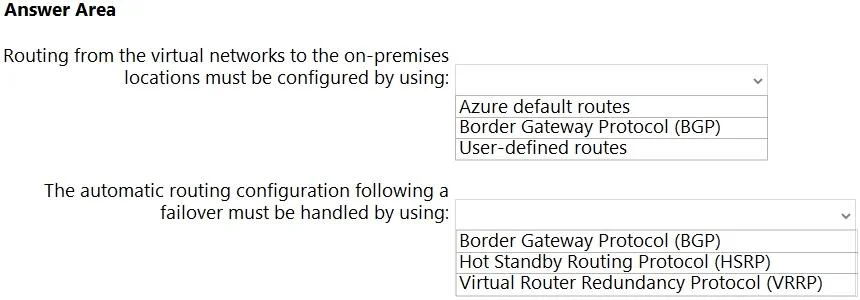
Answer Area
- Routing from the virtual networks to the on-premises locations must be configured by using:Border Gateway Protocol (BGP)Azure default routesBorder Gateway Protocol (BGP)User-defined routes
- The automatic routing configuration following a failover must be handled by using:Border Gateway Protocol (BGP)Border Gateway Protocol (BGP)Hot Standby Routing Protocol (HSRP)Virtual Router Redundancy Protocol (VRRP)
Explanation
Hotspot Explanation: ExpressRoute + BGP Routing
Dropdown 1: Routing from virtual networks to on-premises must be configured using Border Gateway Protocol (BGP)
Why BGP is correct:
BGP is the routing protocol that ExpressRoute uses natively. When you have ExpressRoute circuits connecting Azure VNets to on-premises sites, BGP is the mechanism by which routes are exchanged between Azure and your on-premises routers. To route outbound internet traffic through the closest on-premises site, the on-premises routers advertise a default route (0.0.0.0/0) back to Azure over BGP. Azure then selects the best path based on BGP attributes (AS path, local preference, etc.), naturally directing traffic to the nearest site.
Why the alternatives are wrong:
- Azure default routes - These are Azure's built-in system routes (e.g., route internet traffic directly out via Azure). They don't involve on-premises and cannot route traffic through an on-premises site.
- User-defined routes (UDRs) - UDRs are static overrides applied per-subnet. They can't dynamically respond to topology changes across ExpressRoute and don't scale across multiple circuits dynamically. They require manual updates.
Dropdown 2: Automatic routing following a failover must be handled by Border Gateway Protocol (BGP)
Why BGP is correct:
BGP is a dynamic routing protocol - it continuously monitors the health of peering sessions. If a New York ExpressRoute circuit fails, the BGP session drops, and the route advertised by New York (e.g., the default route 0.0.0.0/0) is withdrawn. Azure automatically reroutes traffic through the Los Angeles circuit because BGP reconverges on the next available path. This is fully automatic - no human intervention required.
Why the alternatives are wrong:
- HSRP (Hot Standby Routing Protocol) - A Cisco-proprietary first-hop redundancy protocol (FHRP) used to provide a virtual default gateway IP on a LAN segment. It operates at Layer 3 within a local network, not across WAN/ExpressRoute circuits. It has no role in Azure routing.
- VRRP (Virtual Router Redundancy Protocol) - The open-standard equivalent of HSRP. Same limitation: it's a local gateway redundancy protocol for LAN environments. It does not control inter-site or cloud routing paths.
Core Concept
The entire solution hinges on one idea: ExpressRoute mandates BGP. There is no other routing protocol option with ExpressRoute - BGP is required. This means:
- Route selection (closest site) = BGP path attributes
- Route failover (automatic rerouting) = BGP session failure detection + convergence
Both dropdowns correctly point to BGP because it handles both the steady-state routing policy and the dynamic failure recovery.
Topics
Community Discussion
No community discussion yet for this question.