
AZ-120 · Question #191
Drag and Drop Question You have an on-premises SAP NetWeaver-based ABAP deployment hosted on servers that run Windows Server or Linux. You plan to migrate the deployment to Azure. What will…
The correct answer is Deleting the Azure virtual machine and recreating a new virtual machine that uses the same disks; Changing the hostname assigned to the operating system; Replacing the primary NIC. SAP NetWeaver ABAP License Invalidation on Azure Core Concept SAP NetWeaver ABAP licenses are tied to a hardware key - a fingerprint generated from OS-specific system attributes. If those attributes change, the hardware key changes, and the license becomes invalid. The critical…
Question
Drag and Drop Question You have an on-premises SAP NetWeaver-based ABAP deployment hosted on servers that run Windows Server or Linux. You plan to migrate the deployment to Azure. What will invalidate the existing NetWeaver ABAP licenses for each operating system once the servers are migrated to Azure? To answer, drag the appropriate actions to the correct operating systems. Each action may be used once, more than once, or not at all. You may need to drag the split bar between panes or scroll to view content. NOTE: Each correct selection is worth one point. Answer:
Exhibit
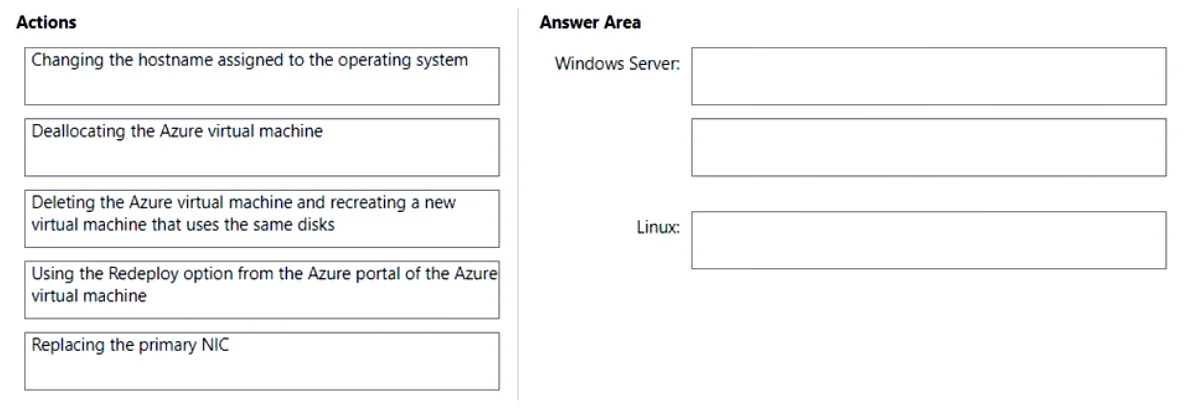
Answer Area
Drag items
Correct arrangement
- Deleting the Azure virtual machine and recreating a new virtual machine that uses the same disks
- Changing the hostname assigned to the operating system
- Replacing the primary NIC
Explanation
SAP NetWeaver ABAP License Invalidation on Azure
Core Concept
SAP NetWeaver ABAP licenses are tied to a hardware key - a fingerprint generated from OS-specific system attributes. If those attributes change, the hardware key changes, and the license becomes invalid. The critical insight is that Windows and Linux use different attributes to generate this key.
The Mapping
| # | Action | Target OS | Why |
|---|---|---|---|
| 1 | Deleting the VM and recreating with same disks | Windows Server | Azure assigns a new VM identity; Windows re-detects virtual hardware changes, producing a new hardware key |
| 2 | Changing the hostname | Windows Server | Windows SAP hardware key is hostname-based - rename the machine, key changes |
| 3 | Replacing the primary NIC | Linux | Linux SAP hardware key is MAC address-based - new NIC = new MAC = new key |
Per-Placement Explanation
Item 1 - "Deleting and recreating the VM (same disks)" → Windows Server
Even though the disks are identical, deleting a VM in Azure destroys its underlying identity. When Azure creates a new VM object and Windows boots, it can detect changes to virtual hardware components that feed into SAP's hardware key calculation. The license installed on disk no longer matches the new key.
Item 2 - "Changing the hostname" → Windows Server
On Windows, SAP derives the hardware key primarily from the computer name (hostname). This is the most direct invalidation path. Renaming the machine immediately generates a mismatched key. This is why keeping hostnames stable during Azure migrations is critical.
Item 3 - "Replacing the primary NIC" → Linux
On Linux, SAP derives the hardware key from the MAC address of the primary network interface. Replacing the NIC assigns a new MAC address, producing a completely different hardware key. This is the Linux equivalent of renaming on Windows.
Why the Other Options Do NOT Invalidate
| Action | Why it's safe |
|---|---|
| Deallocating the VM | Azure freezes and restores the VM's identity (hostname, MAC, NIC config) on reallocation. No attributes change. |
| Using Redeploy | Moves the VM to a different physical Azure host, but Azure fully preserves all network and OS identity attributes. SAP sees no difference. |
Common Mistakes
-
Assuming deallocation breaks licenses - Many candidates confuse "the VM goes offline" with "hardware changes." Azure preserves identity on stop/start cycles.
-
Applying Redeploy incorrectly - Redeploy sounds disruptive, but it's designed to preserve VM configuration. It's not an invalidation trigger.
-
Mixing up the per-OS attribute - The most common error is assigning "hostname" to Linux or "MAC address" to Windows. Remember: Windows = hostname, Linux = MAC address.
-
Thinking same disks = same license - Recreating a VM with the same disks doesn't restore license validity on Windows, because the hardware key mismatch is detected at the OS/VM identity level, not the disk level.