AZ-120 · Question #154
Drag and Drop Question You have an on-premises SAP landscape that uses a DB2 database and contains an SAP Financial Accounting (SAP FIN) deployment. The deployment contains a file share that stores…
The correct answer is SAP Database Migration Option (DMO) with System Move; Azure Data Box Gateway. SAP to Azure Migration - Drag-and-Drop Explained This question maps two distinct resources to the correct migration tool: | Resource to Migrate | Correct Tool | |---|---| | SAP FIN on DB2 database | SAP DMO with System Move | | 50 TB bitmap file share | Azure Data Box Gateway |…
Question
Drag and Drop Question You have an on-premises SAP landscape that uses a DB2 database and contains an SAP Financial Accounting (SAP FIN) deployment. The deployment contains a file share that stores 50 TB of bitmap files. You plan to migrate the on-premises SAP landscape to SAP HANA on Azure (Large Instances) and Azure Files shares. The solution must meet the following requirements:
- Minimize downtime.
- Minimize administrative effort.
You need to recommend a migration solution. What should you recommend for each resource? To answer, drag the appropriate services to the correct resources. Each service may be used once, more than once, or not at all. You may need to drag the split bar between panes or scroll to view content. Answer:
Exhibit
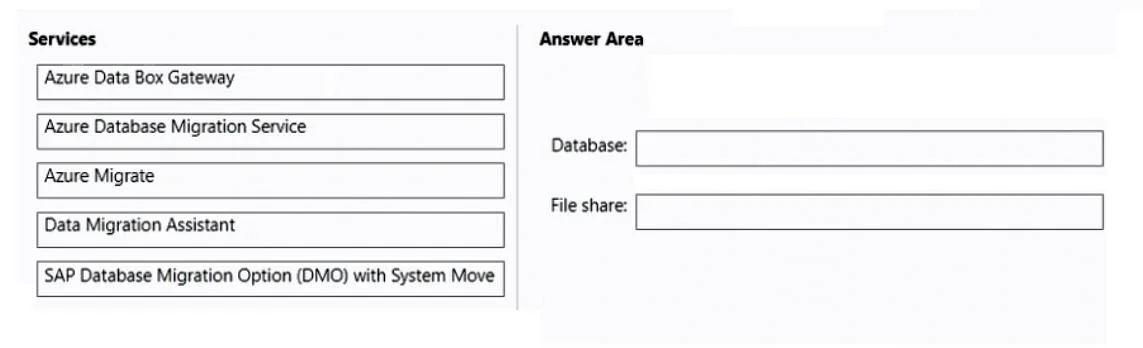
Answer Area
Drag items
Correct arrangement
- SAP Database Migration Option (DMO) with System Move
- Azure Data Box Gateway
Explanation
SAP to Azure Migration - Drag-and-Drop Explained
This question maps two distinct resources to the correct migration tool:
| Resource to Migrate | Correct Tool |
|---|---|
| SAP FIN on DB2 database | SAP DMO with System Move |
| 50 TB bitmap file share | Azure Data Box Gateway |
Placement 1: SAP Database (DB2 → SAP HANA on Azure Large Instances)
Tool: SAP Database Migration Option (DMO) with System Move
DMO is SAP's own tool designed specifically to:
- Migrate from a source database (DB2) to SAP HANA in a single pass - no intermediate steps
- Perform a system move simultaneously (relocating to new infrastructure/OS/cloud)
- Minimize downtime because the migration and move are combined rather than sequential
The "with System Move" variant is key here - it handles migrating to a different host (on-premises → Azure Large Instances), which is exactly this scenario.
Placement 2: 50 TB File Share → Azure Files
Tool: Azure Data Box Gateway
Azure Data Box Gateway is a virtual appliance that acts as a continuous sync bridge between on-premises storage and Azure Files/Blob. For this use case:
- It transfers data online, while the system is still running, minimizing downtime
- It requires no physical hardware shipment, minimizing administrative effort
- It natively integrates with Azure Files via SMB/NFS, making it a natural fit for file share migration
Why Not the Other Options?
| Tool | Why It's Wrong Here |
|---|---|
| Azure Database Migration Service | Supports SQL Server, MySQL, PostgreSQL - not SAP/DB2 to HANA migrations |
| Azure Migrate | A discovery/assessment/lift-and-shift tool for VMs, not SAP database migration |
| Data Migration Assistant | SQL Server–only assessment tool; irrelevant to SAP/DB2 environments |
Common Misconceptions
- Azure DMS ≠ SAP migration tool. Despite the name, Azure Database Migration Service does not handle SAP-specific database types or the HANA conversion process.
- Azure Data Box vs. Data Box Gateway. Physical Data Box requires shipping hardware (slower, more effort). Data Box Gateway is virtual and enables continuous online transfer - better when minimizing downtime is a requirement.
- Azure Migrate is not a migration executor. It discovers, assesses, and plans workloads - it doesn't perform the actual database or file migration itself.
- DMO handles both concerns at once. A common mistake is thinking you need two tools for the database (one to convert DB2→HANA, one to move to Azure). DMO with System Move does both in a single operation.
Topics
Community Discussion
No community discussion yet for this question.
